pacman::p_load(tidyverse)Hands-On Exercise 01
Overview
This chapter covers the fundamental principles and essential components of ggplot2. By integrating practical exercises with the “Layered Grammar of Graphics” framework, it demonstrates how to construct sophisticated and functional statistical visualizations. The ultimate objective is to enable the effective application of graphical elements to produce professional-grade data displays.
1 Getting Started
1.1 Installing and loading the required libraries
Note: Ensure that the pacman package has already been installed.
The code chunk below uses p_load() of pacman package to check if tidyverse packages are installed in the computer. If they are, then they will be launched into R. Otherwise, tidyverse will be installed and launched into R.
1.2 The Data
The code chunk below imports exam_data.csv into R environment by using read_csv() function of readr package.
readr is one of the tidyverse package.
exam_data <- read_csv("data/Exam_data.csv")Data contains:
Year end examination grades of a cohort of primary 3 students from a local school.
There are a total of seven attributes. Four of them are categorical data type and the other three are in continuous data type.
The categorical attributes are: ID, CLASS, GENDER and RACE.
The continuous attributes are: MATHS, ENGLISH and SCIENCE.
2 Introducing ggplot
2.1 Overview
ggplot2 is a system for declaratively creating graphics, based on The Grammar of Graphics. You provide the data, tell ggplot2 how to map variables to aesthetics, what graphical primitives to use, and it takes care of the details.
2.2 R Graphics VS ggplot
hist(exam_data$MATHS)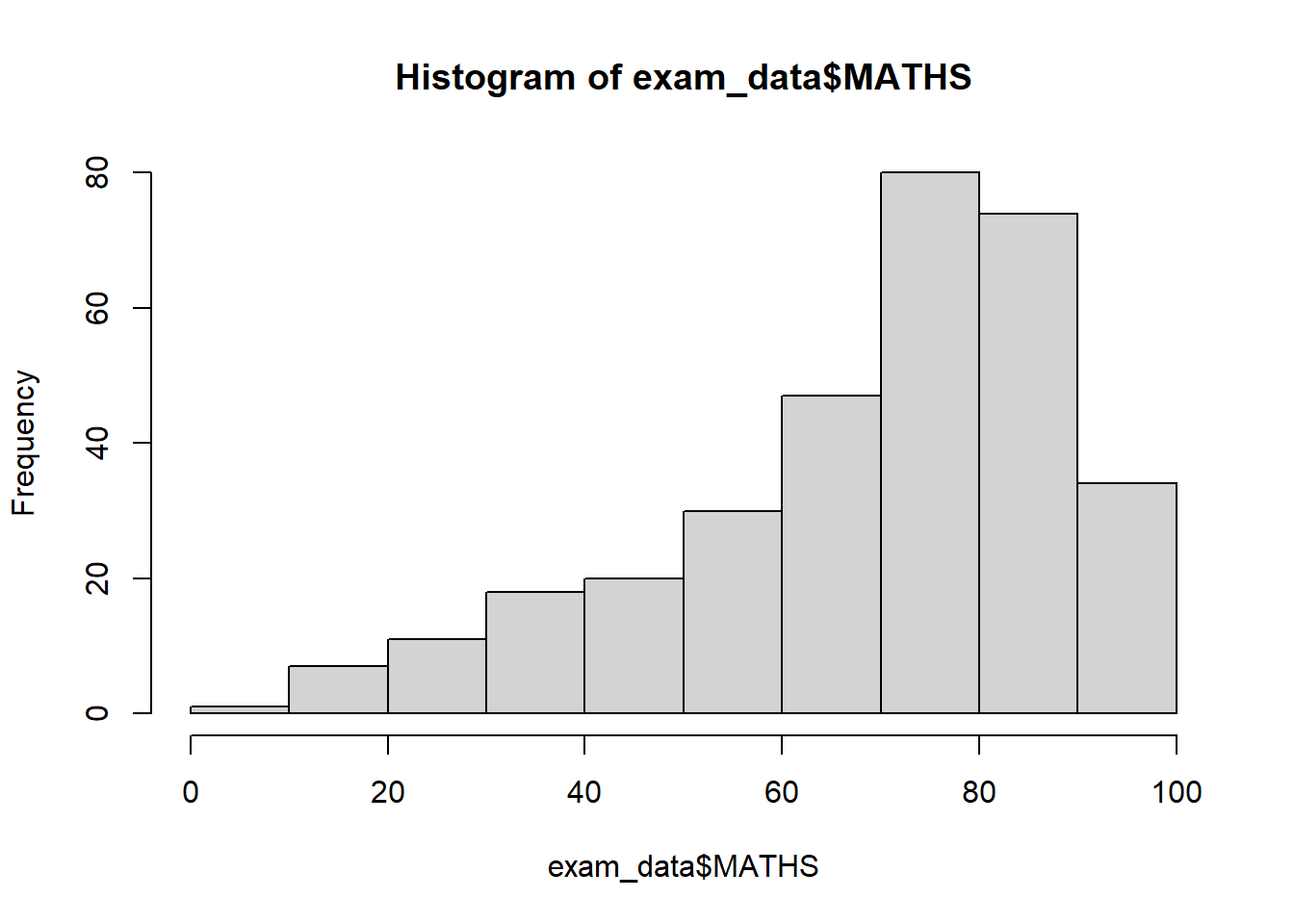
ggplot(data=exam_data, aes(x = MATHS)) +
  geom_histogram(bins=10,
                 boundary = 100,
                 color="black",
                 fill="grey") +
  ggtitle("Distribution of Maths scores")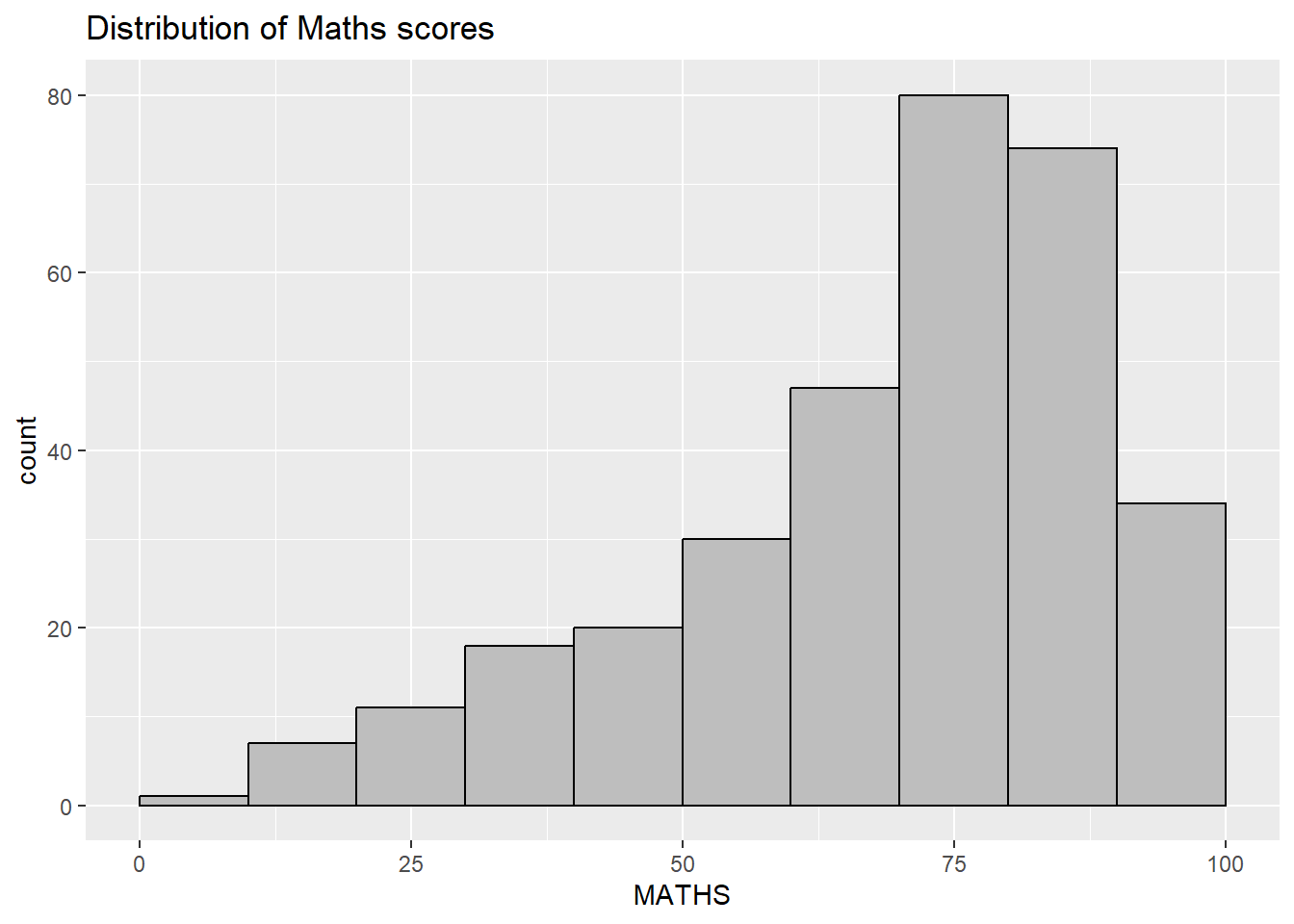
Note
Benefits of ggplot2 over in-built R graphics
I believe ggplot2 shines most when dealing with complex data because of its layering logic. It works like building blocks—using the + operator to stack points, lines, and labels. This makes the code logic incredibly clear and much easier to maintain or modify.
I also feel it saves a lot of time because it handles so much automatically. Once I map a column to an axis or a color, it takes care of the scaling and legend generation for me. It’s far more efficient than the manual setup required in Base R.
3.Compared to Base R, I find it much more powerful for multi-dimensional data. With just a single line like facet_wrap, I can instantly generate sub-plots for different categories, which is the best way to visualize and compare trends across groups.
3 Grammar of Graphics
3.1 Introduction
The “Grammar of Graphics” framework was first proposed by Leland Wilkinson in 1999. It breaks down complex visualizations into semantic components, such as Scales and Layers, essentially defining the fundamental nature of what a statistical graphic is.
The core of the Grammar of Graphics lies in defining a set of rules for structuring mathematical and aesthetic elements into a meaningful graph. The theory is built upon two key principles:
- Graphics = distinct layers of grammatical elements
- Meaningful plots through aesthetic mapping
A good grammar of graphics will allow us to gain insight into the composition of complicated graphics, and reveal unexpected connections between seemingly different graphics (Cox 1978). It also provides a strong foundation for understanding a diverse range of graphics. Furthermore, it may also help guide us on what a well-formed or correct graphic looks like, but there will still be many grammatically correct but nonsensical graphics.
3.2 A Layered Grammar of Graphics
ggplot2 is an implementation of Leland Wilkinson’s Grammar of Graphics. 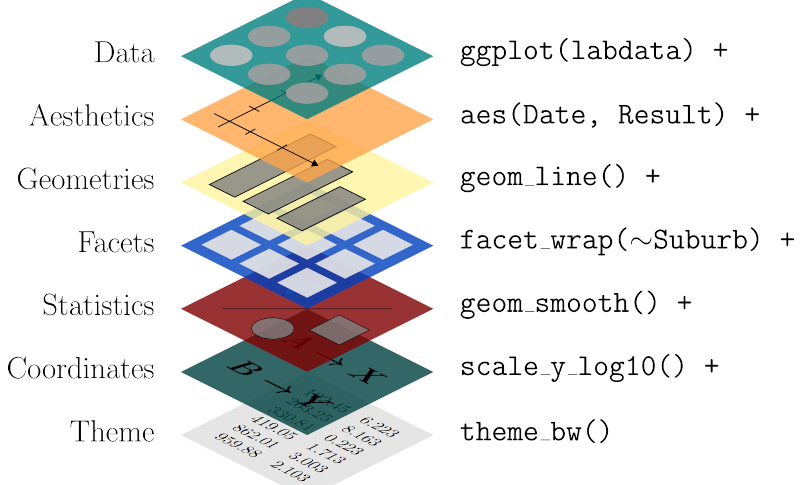 There are seven grammars of ggplot2:
Data: The dataset being plotted.
Aesthetics take attributes of the data and use them to influence visual characteristics, such as position, colours, size, shape, or transparency.
Geometrics: The visual elements used for our data, such as point, bar or line.
Facets split the data into subsets to create multiple variations of the same graph (paneling, multiple plots).
Statistics, statiscal transformations that summarise data (e.g. mean, confidence intervals).
Coordinate systems define the plane on which data are mapped on the graphic.
Themes modify all non-data components of a plot, such as main title, sub-title, y-aixs title, or legend background.
4 Essential Grammatical Elements in ggplot2: data
Call the ggplot() function using the code chunk below
ggplot(data=exam_data)
Note
- A blank canvas appears.
ggplot()initializes a ggplot object.- The data argument defines the dataset to be used for plotting.
- If the dataset is not already a data.frame, it will be converted to one by
fortify().
5 Essential Grammatical Elements in ggplot2: Aesthetic mappings
The aesthetic mappings take attributes of the data and use them to influence visual characteristics, e.g., position, colour, size, shape, or transparency. Each visual characteristic can thus encode an aspect of the data and be used to convey information.
All aesthetics of a plot are specified in the aes() function call.
Code chunk below adds the aesthetic element into the plot.
ggplot(data=exam_data,
       aes(x= MATHS))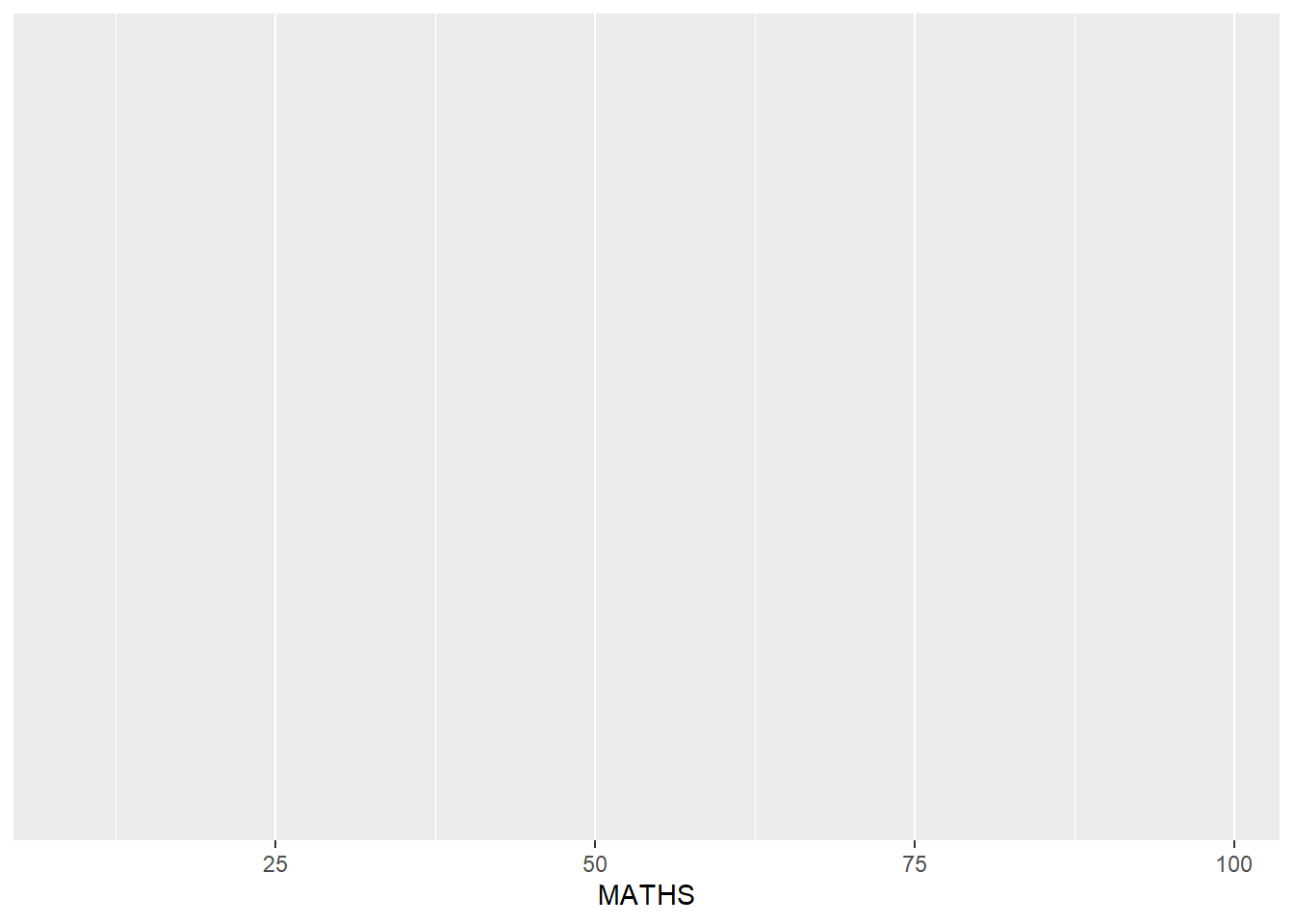
Note
- ggplot includes the x-axis and the axis’s label.
6 Essential Grammatical Elements in ggplot2:
6.1 Introduction
Geometric objects are the actual marks we put on a plot. Some examples:
geom_point for drawing individual points (e.g., a scatter plot)
geom_line for drawing lines (e.g., for a line charts)
geom_smooth for drawing smoothed lines (e.g., for simple trends or approximations)
geom_bar for drawing bars (e.g., for bar charts)
geom_histogram for drawing binned values (e.g. a histogram)
geom_polygon for drawing arbitrary shapes
geom_map for drawing polygons in the shape of a map! (You can access the data to use for these maps by using the map_data() function).
Note
Note: A plot must have at least one geom; there is no upper limit. A geom can be added to a plot using the + operator.
6.2 Geometric Objects: geom_bar
The code chunk below plots a bar chart by using geom_bar()
ggplot(data=exam_data,
       aes(x=RACE)) +
  geom_bar()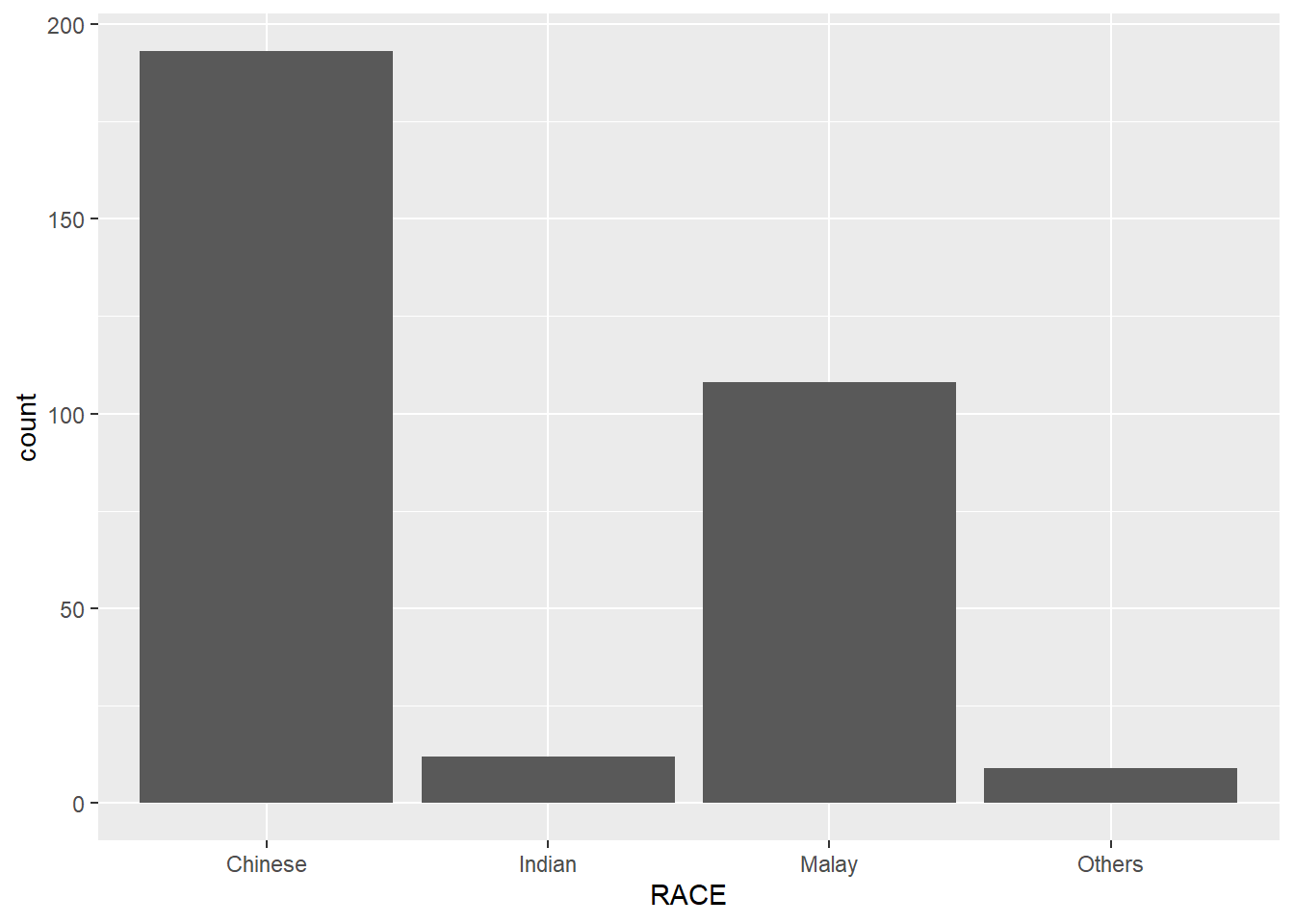
6.3 Geometric Objects: geom_dotplot
In a dot plot, the width of a dot corresponds to the bin width (or maximum width, depending on the binning algorithm), and dots are stacked, with each dot representing one observation.
In the code chunk below, geom_dotplot() of ggplot2 is used to plot a dot plot.
ggplot(data=exam_data,
       aes(x = MATHS)) +
  geom_dotplot(dotsize = 0.5)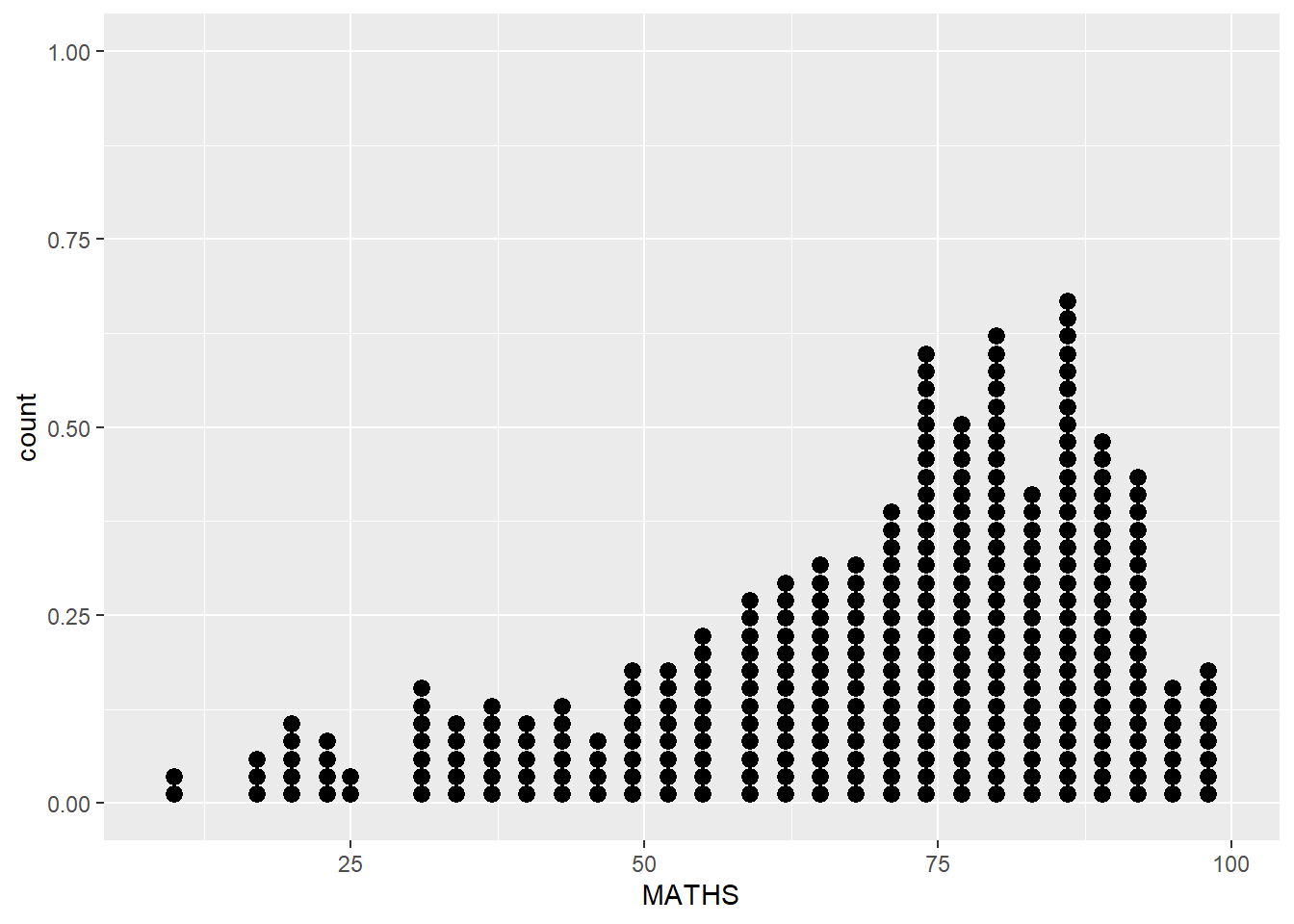
Caution
The y scale is misleading and not very useful.
The code chunk below does the following:
scale_y_continuous()is used to turn off the y-axis, andbinwidth argument is used to change the binwidth to 2.5.
ggplot(data=exam_data,
       aes(x = MATHS)) +
  geom_dotplot(binwidth=2.5,
               dotsize = 0.5) +
  scale_y_continuous(NULL,
breaks = NULL) 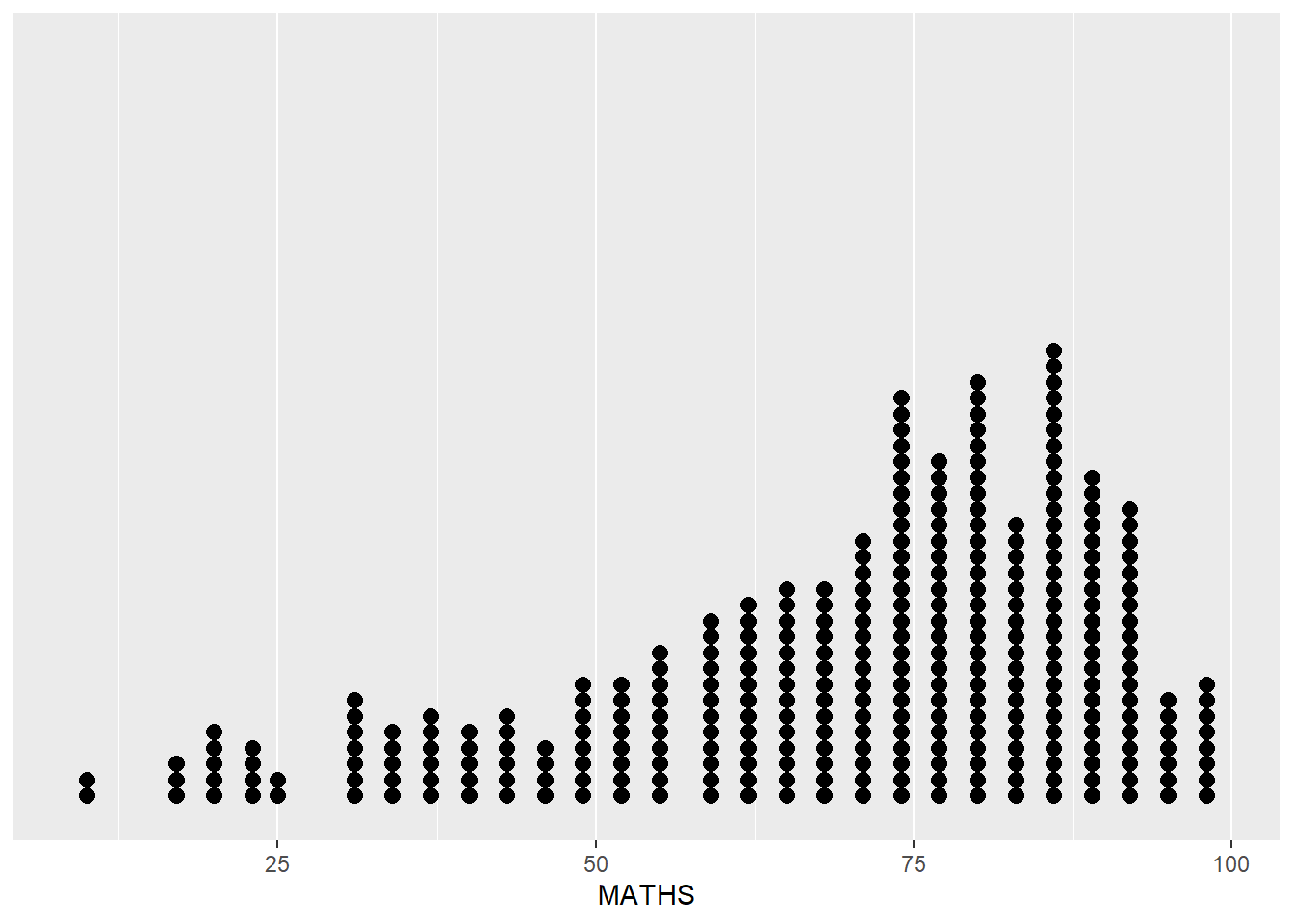
6.4 Geometric Objects: geom_histogram()
The code chunk below, uses geom_histogram() create a simple histogram by using values in MATHS field of exam_data.
ggplot(data=exam_data,
       aes(x = MATHS)) +
geom_histogram() 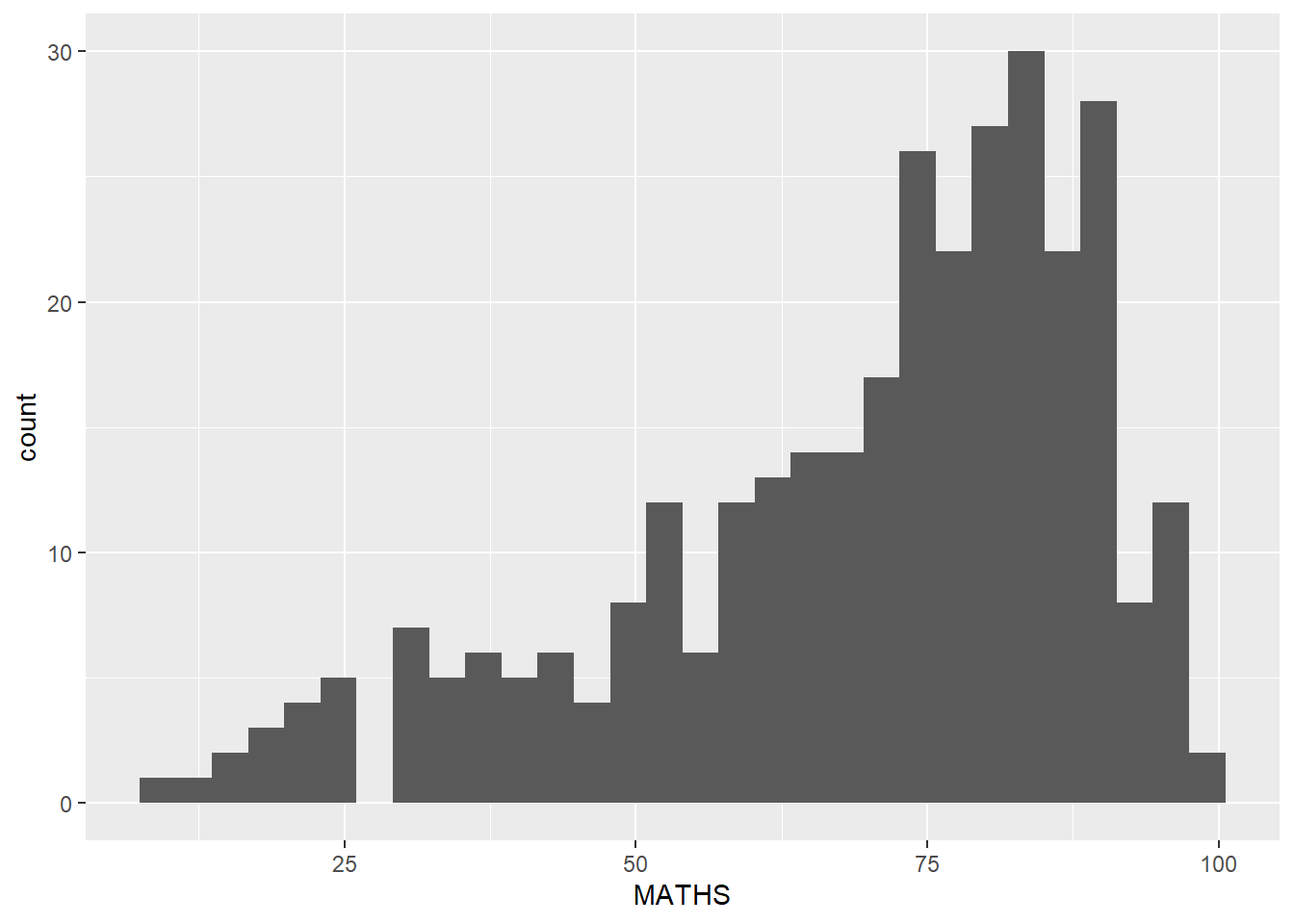
Note
The default bin is 30
6.5 Modifying a geometric object by changing geom()
The code chunk below, does the following: - bins argument is used to change the number of bins to 20
fill argument uses a Morandi color hex code (e.g., “#A3B18A”) to create a muted and professional aesthetic
color argument is adjusted to “gray” to provide a softer visual outline for the bars compared to standard black
ggplot(data=exam_data,
       aes(x= MATHS)) +
  geom_histogram(bins=20,
                 color="gray",
fill="#93A5B3") 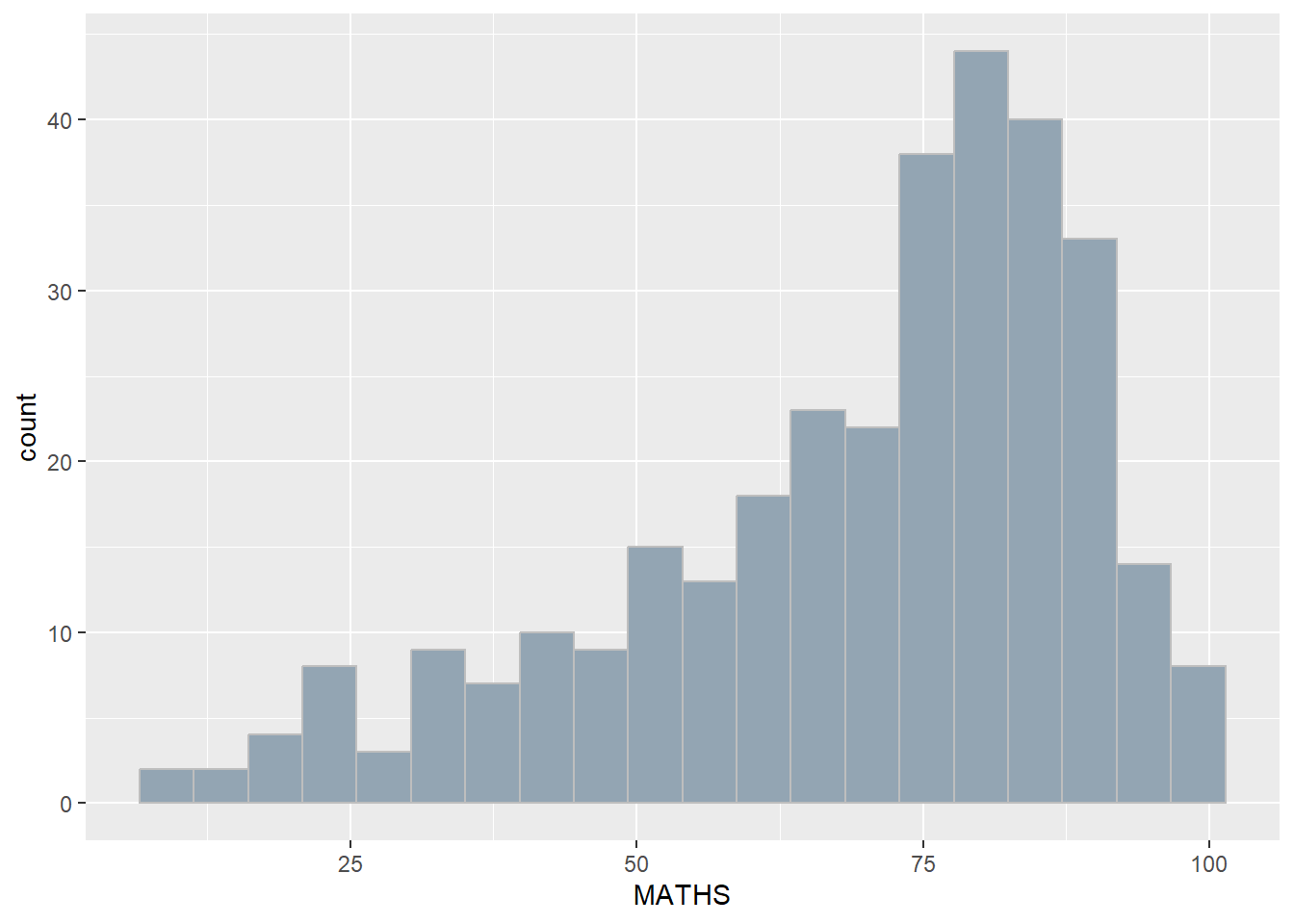
6.6 Modifying a geometric object by changing aes()
The code chunk below changes the interior colour of the histogram (i.e. fill) by using sub-group of aesthetic().
ggplot(data=exam_data,
       aes(x= MATHS,
           fill = GENDER)) +
  geom_histogram(bins=20,
                 color="grey30")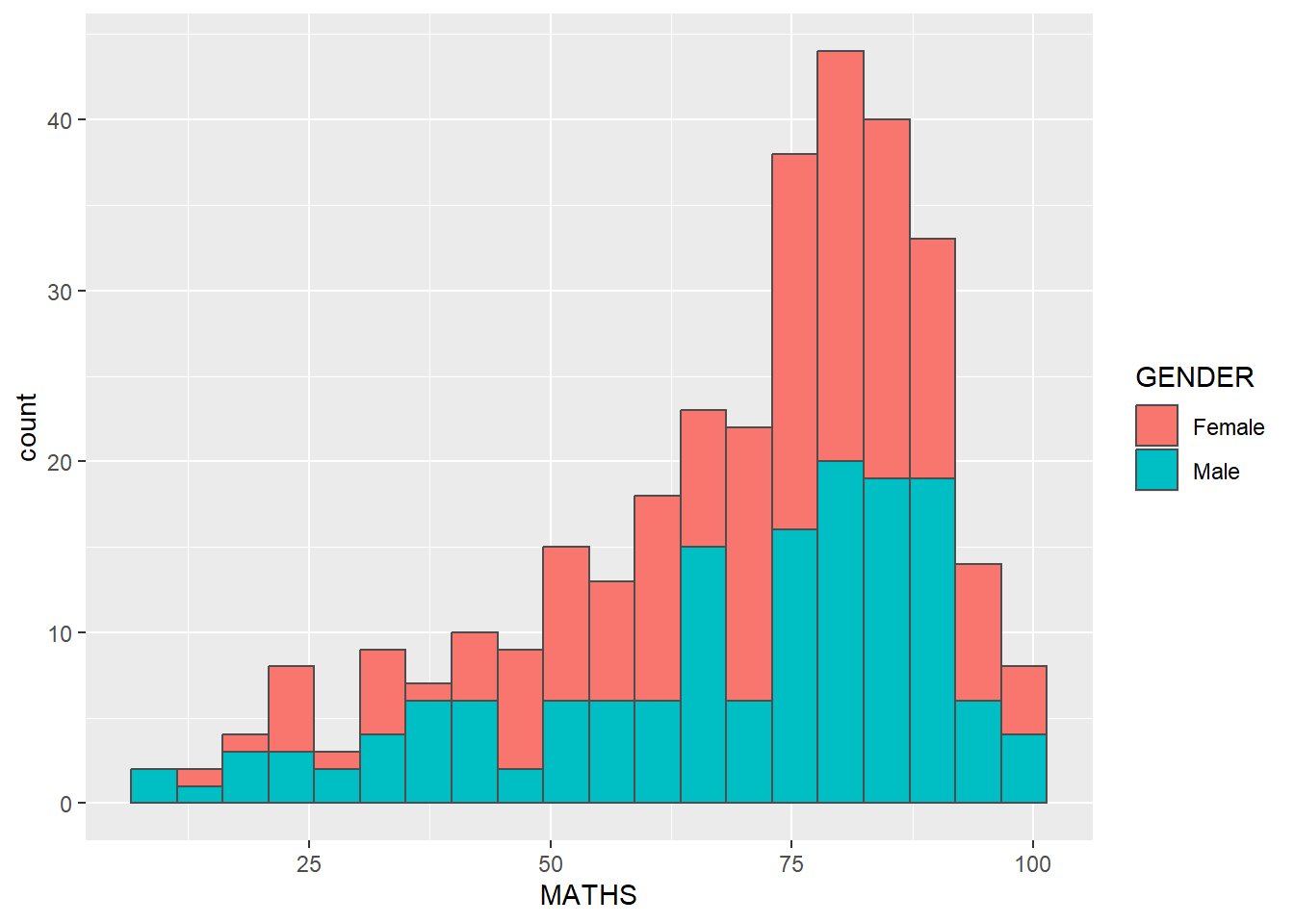
Note
This approach can be used to colour, fill and alpha of the geometric.
ggplot(data=exam_data,
       aes(x= MATHS,
           fill = GENDER)) +
  geom_histogram(bins=20,
                 color="grey30",
                 alpha=0.8) +
  scale_fill_manual(values = c("Female" = "#C2C5CE", "Male" = "#8E9AAF")) +
  theme_minimal()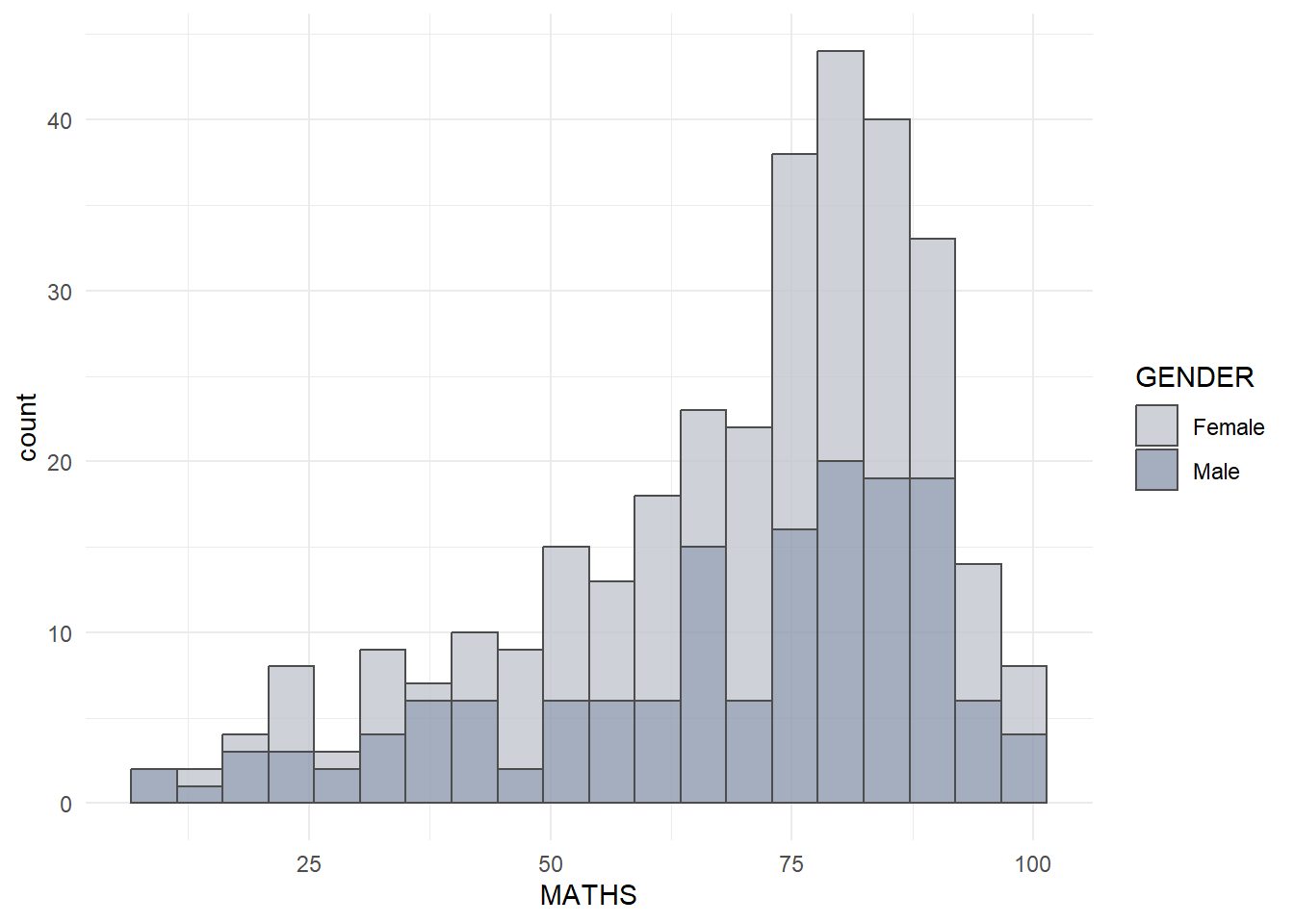
6.7 Geometric Objects: geom-density()
geom-density() computes and plots kernel density estimate, which is a smoothed version of the histogram.
It is a useful alternative to the histogram for continuous data that comes from an underlying smooth distribution.
The code below plots the distribution of Maths scores in a kernel density estimate plot.
ggplot(data=exam_data,
       aes(x = MATHS)) +
geom_density() 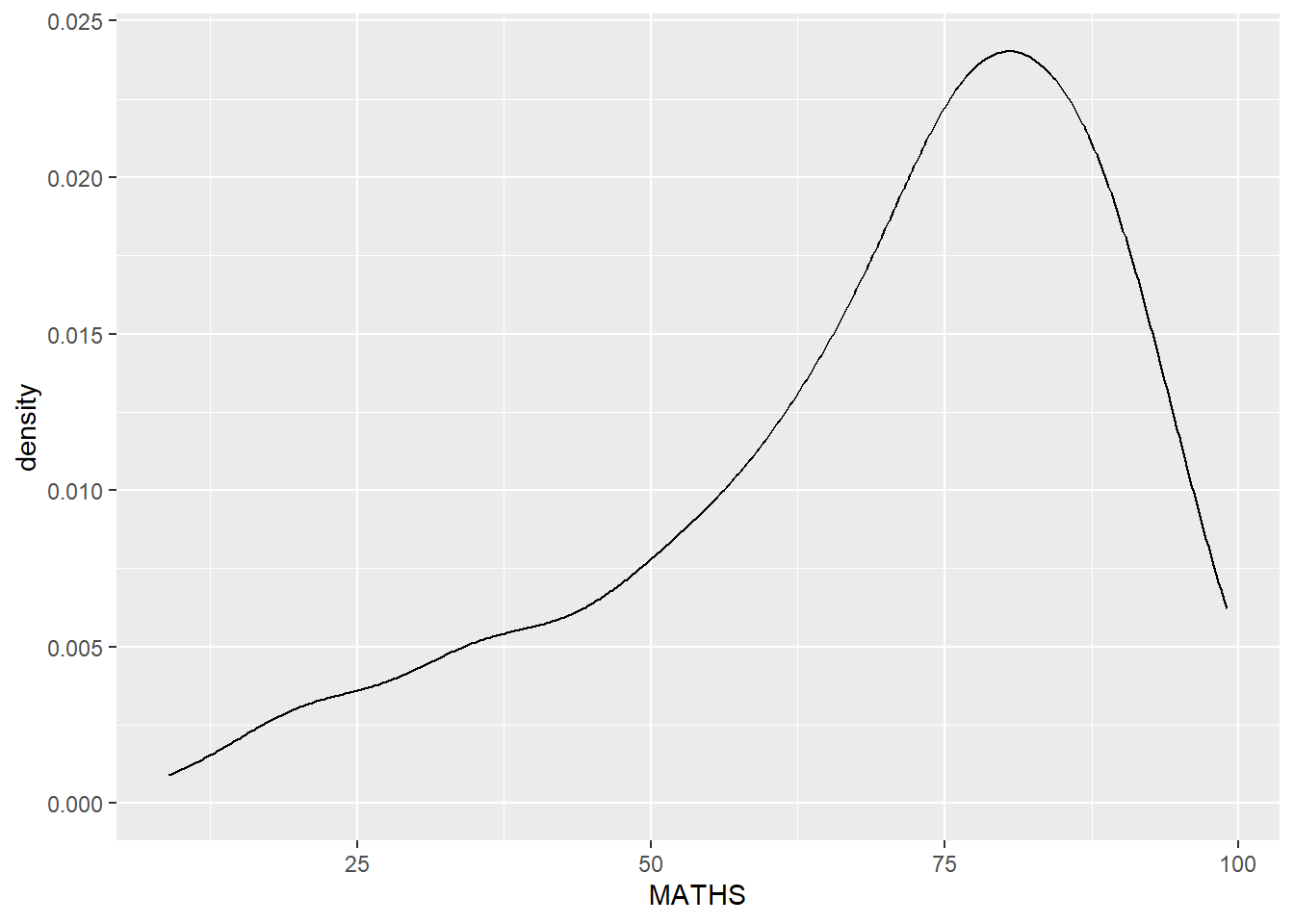
The code chunk below plots two kernel density lines by using colour or fill arguments of aes()
ggplot(data=exam_data,
       aes(x = MATHS,
           colour = GENDER)) +
  geom_density()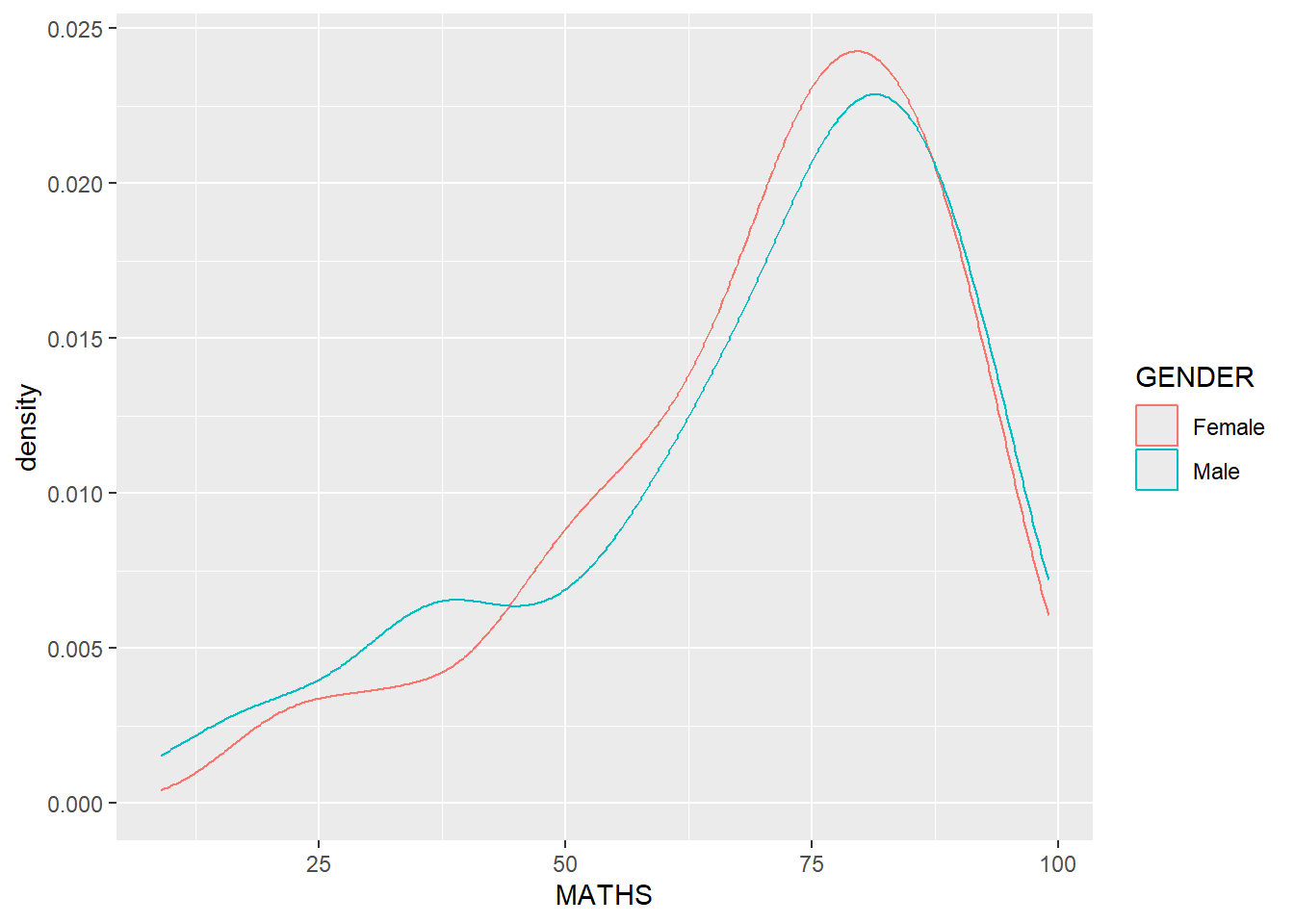
Note
I believe that manual color control is essential for creating a cohesive and professional visual identity.
ggplot(data=exam_data,
       aes(x = MATHS,
           colour = GENDER)) +
  geom_density() +
  scale_colour_manual(values = c("#C2C5CE", "#8E9AAF")) +
  theme_minimal()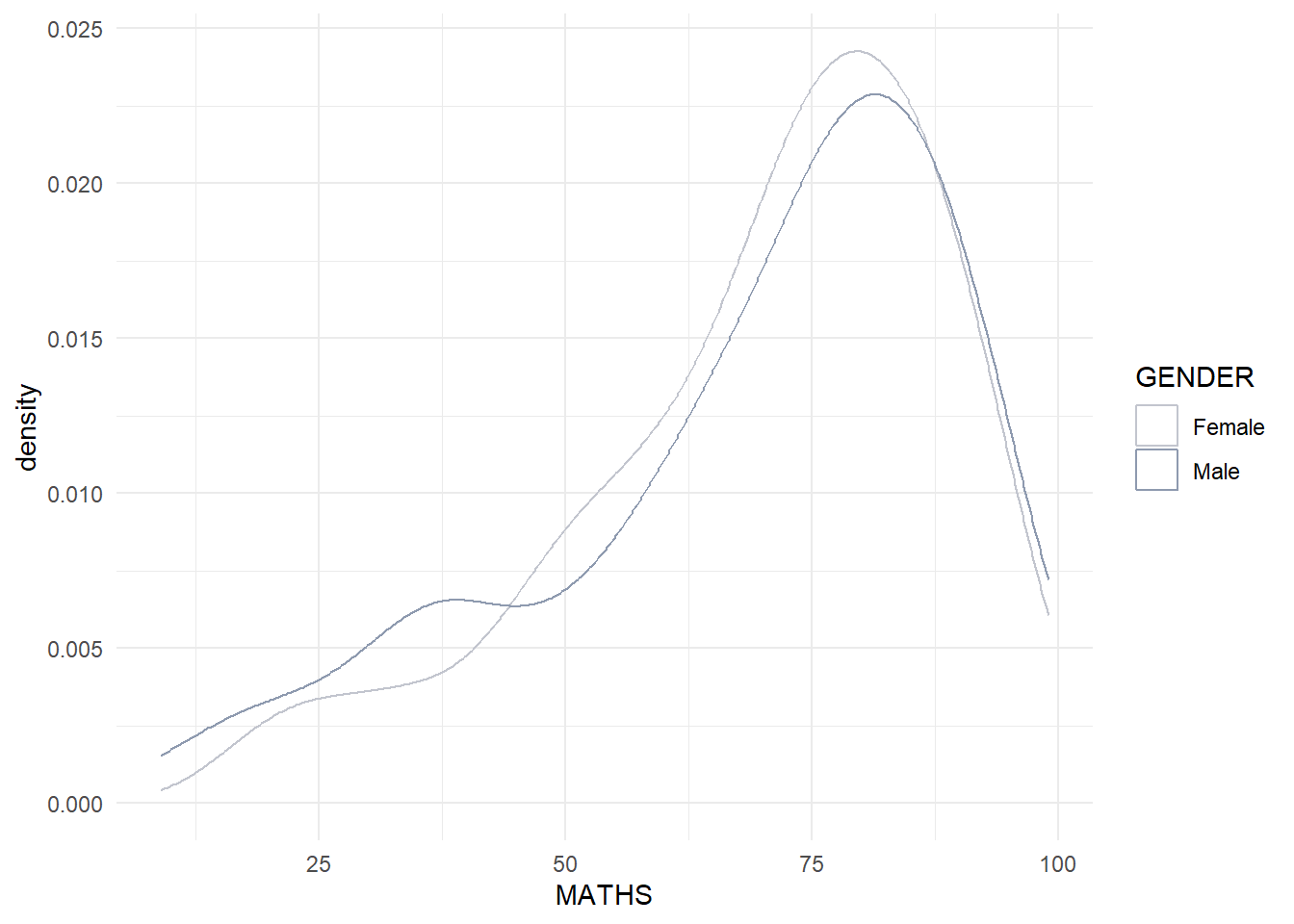
6.8 Geometric Objects: geom_boxplot
geom_boxplot() displays continuous value list. It visualises five summary statistics (the median, two hinges and two whiskers), and all “outlying” points individually.
The code chunk below plots boxplots by using geom_boxplot().
ggplot(data=exam_data,
       aes(y = MATHS,
           x= GENDER)) +
geom_boxplot() 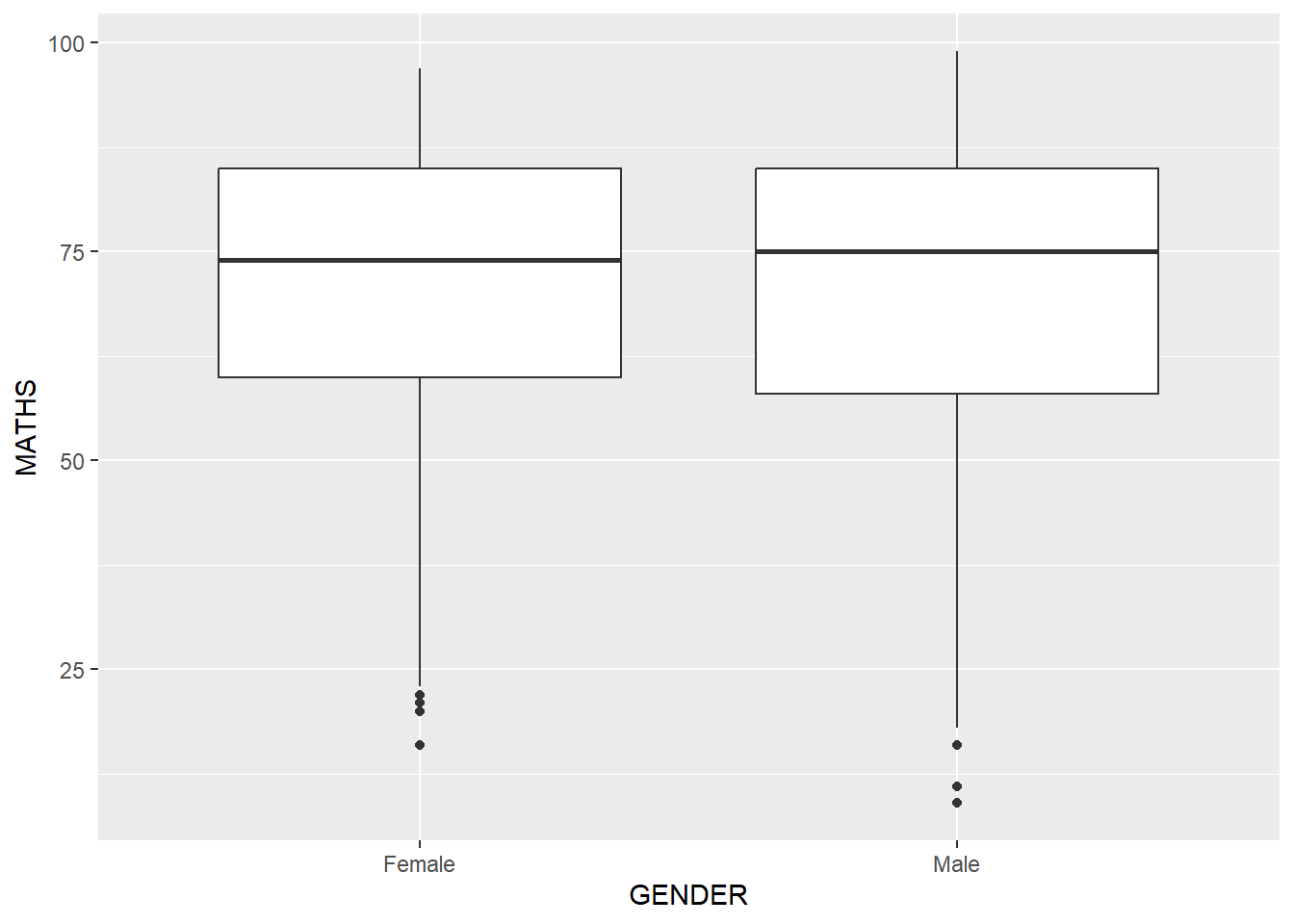
Notches are used in box plots to help visually assess whether the medians of distributions differ. If the notches do not overlap, this is evidence that the medians are different.
The code chunk below plots the distribution of Maths scores by gender in notched plot instead of boxplot.
ggplot(data=exam_data,
       aes(y = MATHS,
           x= GENDER)) +
  geom_boxplot(notch=TRUE)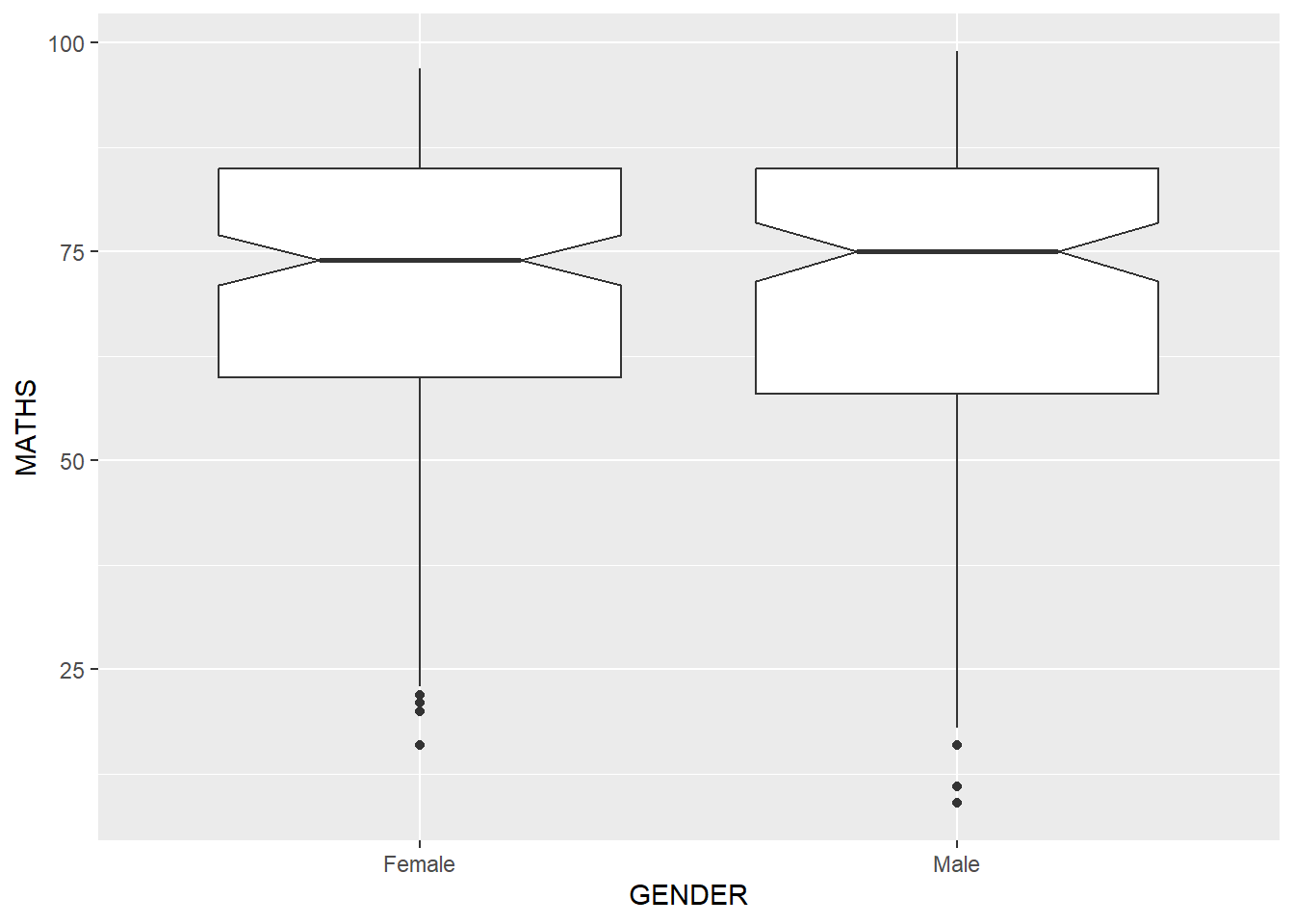
6.8 Geometric Objects: geom_violin
geom_violin is designed for creating violin plot. Violin plots are a way of comparing multiple data distributions. With ordinary density curves, it is difficult to compare more than just a few distributions because the lines visually interfere with each other. With a violin plot, it’s easier to compare several distributions since they’re placed side by side.
The code below plot the distribution of Maths score by gender in violin plot.
ggplot(data=exam_data,
       aes(y = MATHS,
           x= GENDER)) +
  geom_violin()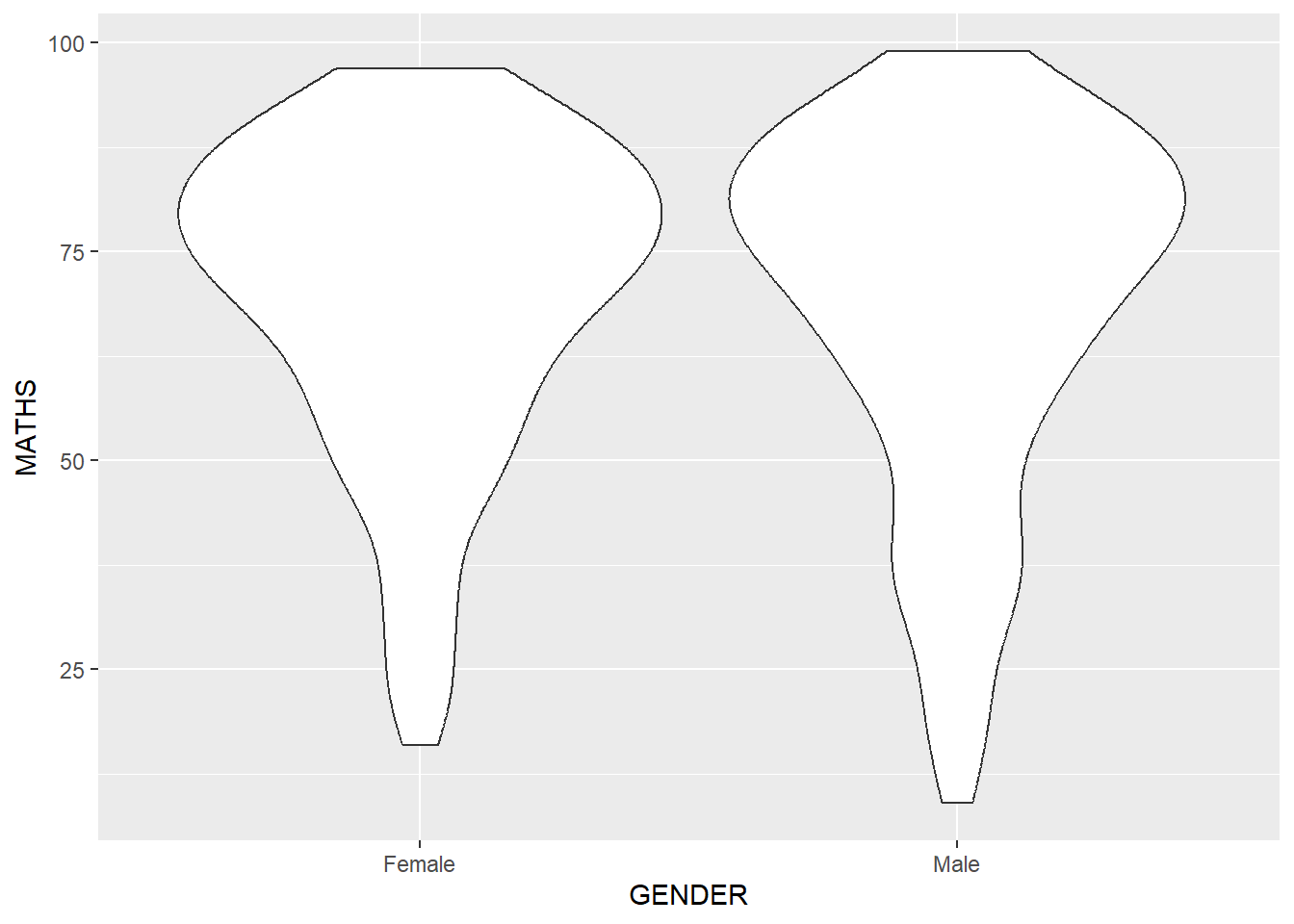
6.9 Geometric Objects: geom_point()
geom_point() is especially useful for creating scatterplot.
The code chunk below plots a scatterplot showing the Maths and English grades of pupils by using geom_point().
ggplot(data=exam_data,
       aes(x= MATHS,
           y=ENGLISH)) +
geom_point() 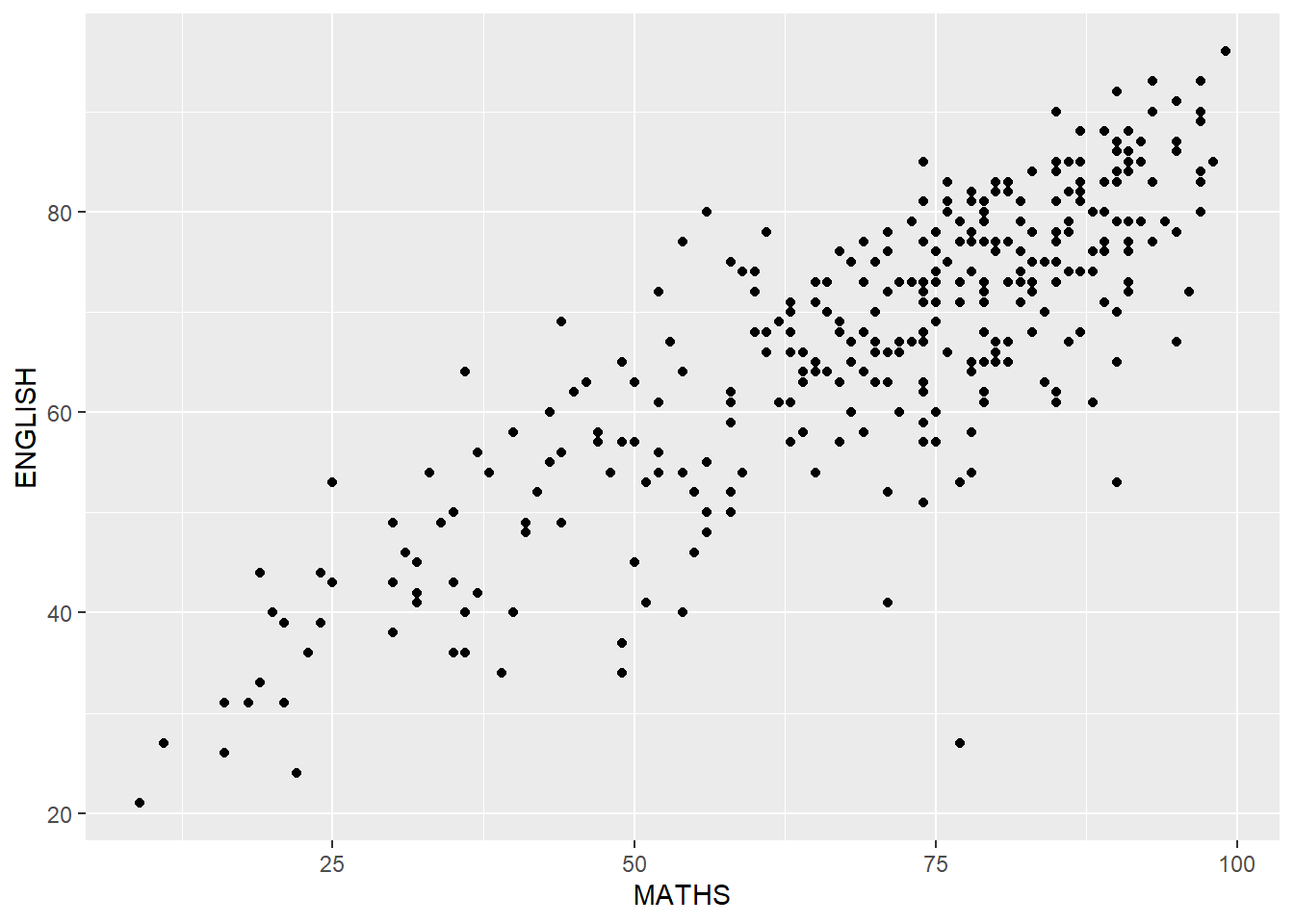
6.10 geom objects can be combined
The code chunk below plots the data points on the boxplots by using both geom_boxplot() and geom_point().
ggplot(data=exam_data,
       aes(y = MATHS,
           x= GENDER)) +
  geom_boxplot() +
  geom_point(position="jitter",
size = 0.5) 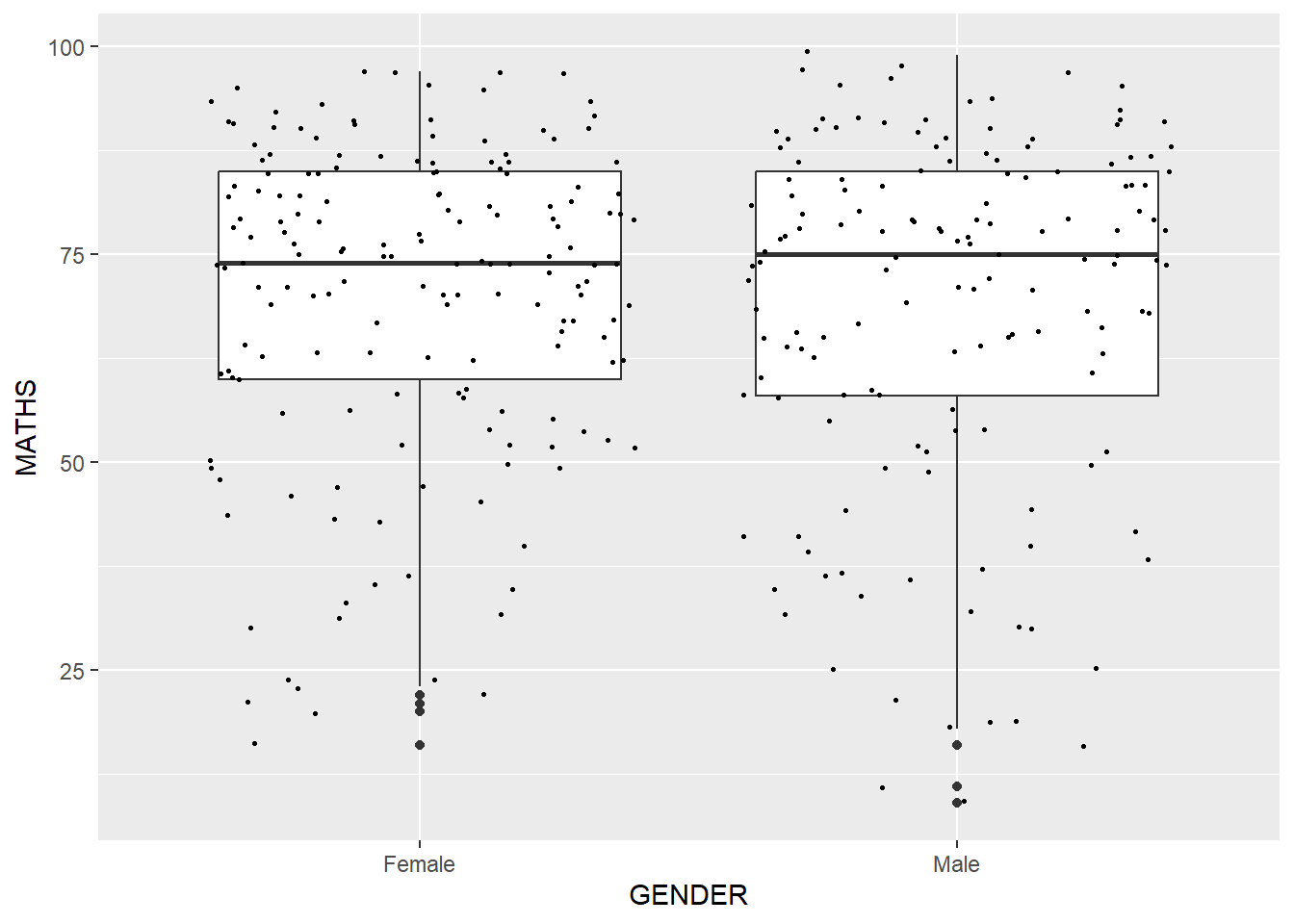
7 Essential Grammatical Elements in ggplot2: stat
7.1 Introduction
The Statistics functions statistically transform data, usually as some form of summary. For example:
frequency of values of a variable (bar graph)
a mean
a confidence limit
There are two ways to use these functions:
add a
stat_()function and override the default geom, oradd a
geom_()function and override the default stat.
7.2 Working with stat()
The boxplots below are incomplete because the positions of the means were not shown.
ggplot(data=exam_data,
       aes(y = MATHS, x= GENDER)) +
  geom_boxplot()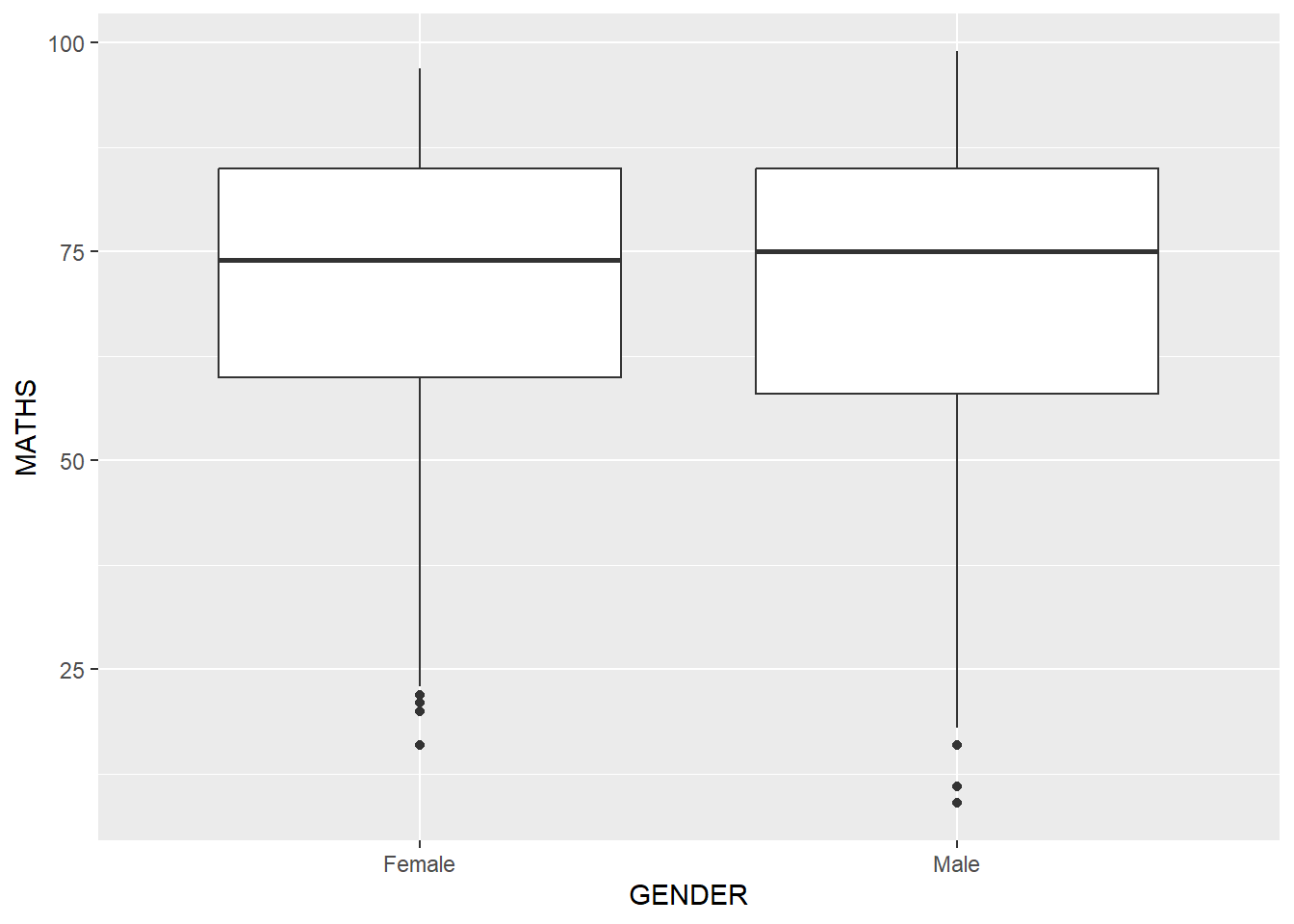
7.3 Working with stat - the stat_summary() method
The code chunk below adds mean values by using stat_summary() function and overriding the default geom.
ggplot(data=exam_data,
       aes(y = MATHS, x= GENDER)) +
  geom_boxplot() +
  stat_summary(geom = "point",
               fun.y="mean",
               colour ="#B47471",
size=4) 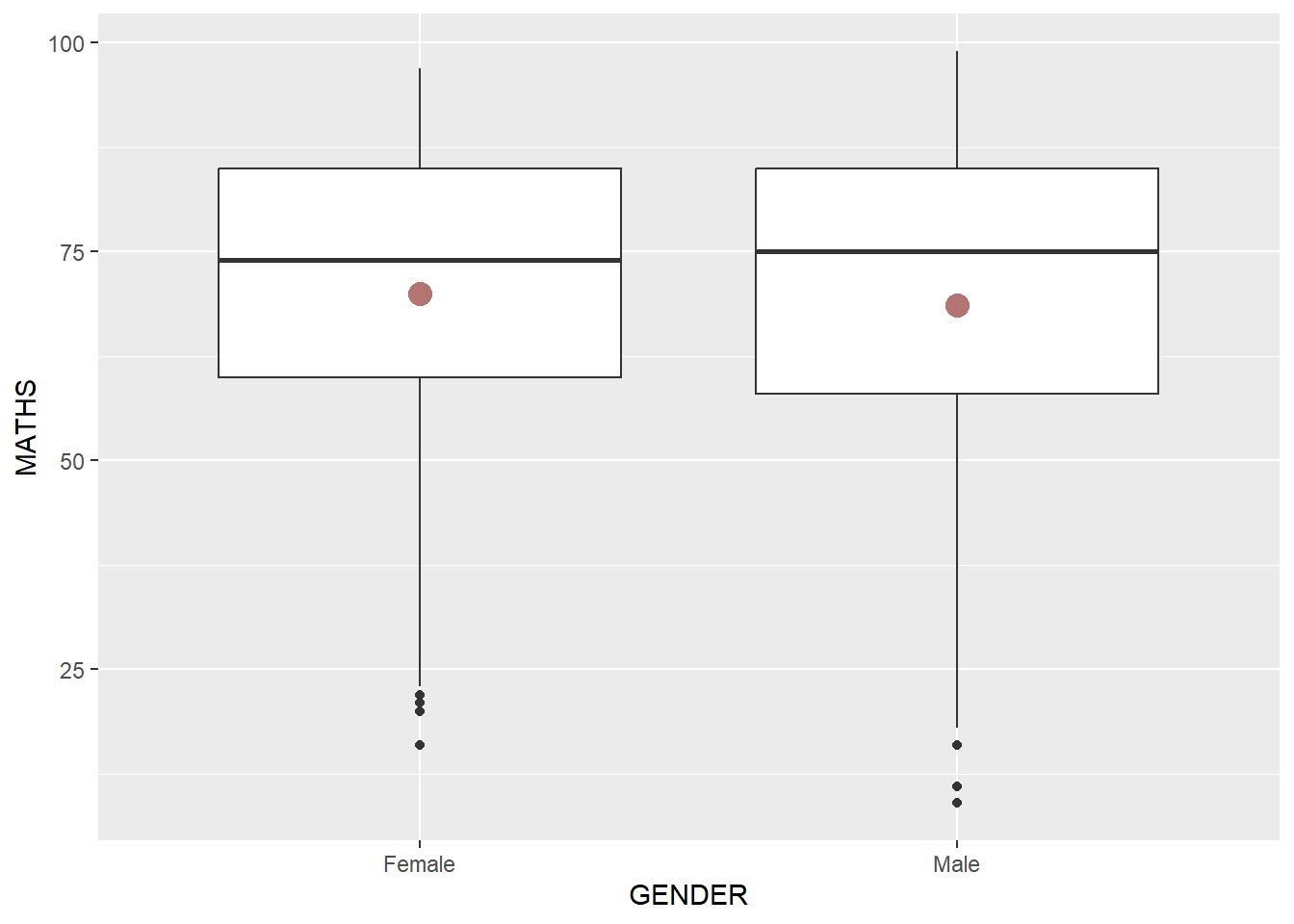
7.4 Adding a best fit curve on a scatterplot
The interpretability of scatterplots can be improved by adding a best fit curve. n the code chunk below, geom_smooth() is used to plot a best fit curve on the scatterplot.
ggplot(data=exam_data,
       aes(x= MATHS, y=ENGLISH)) +
  geom_point() +
  geom_smooth(size=0.5)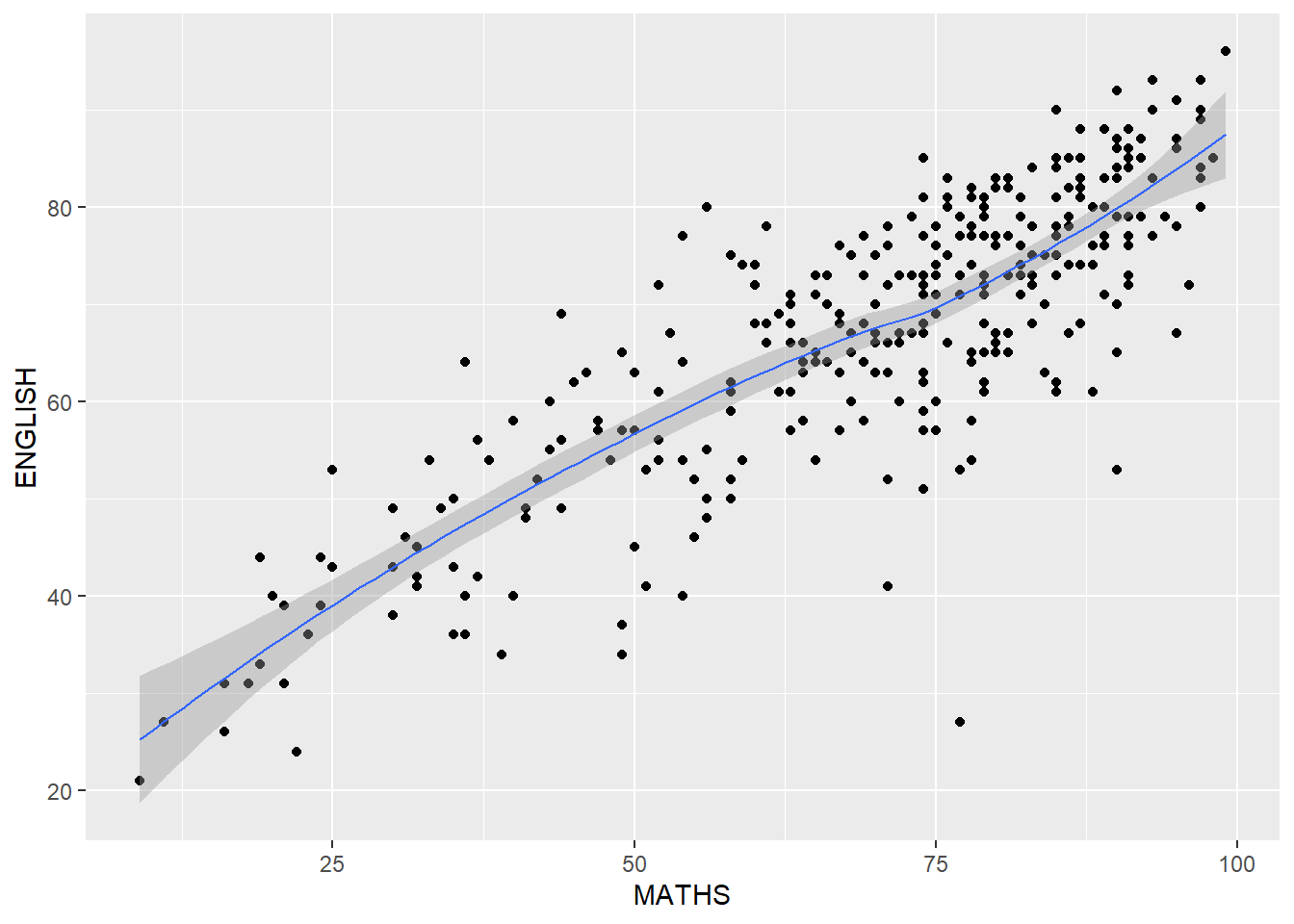
Note
The default method used is loess.
The default smoothing method can be overridden as shown below.
ggplot(data=exam_data,
       aes(x= MATHS,
           y=ENGLISH)) +
  geom_point() +
  geom_smooth(method=lm,
              size=0.5)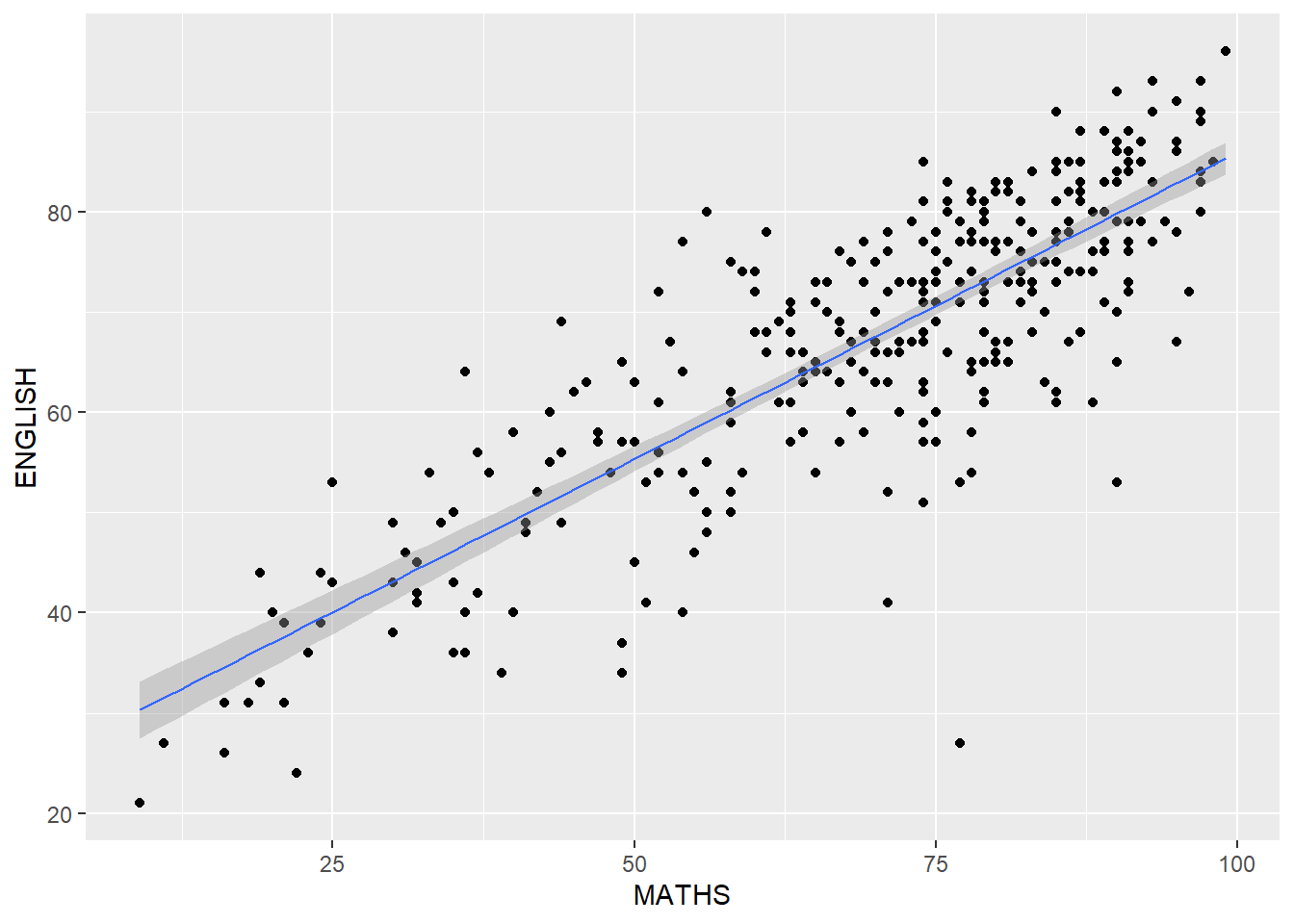
8 Essential Grammatical Elements in ggplot2: Facets
8.1 Introduction
Facetting generates small multiples (aka trellis plot), each displaying a different subset of the data. They are an alternative to aesthetics for displaying additional discrete variables. ggplot2 supports two types of factes: facet_grid() and facet_wrap.
8.2 Working with facet_wrap()
facet_wrap wraps a 1d sequence of panels into 2d. This is generally a better use of screen space than facet_grid because most displays are roughly rectangular.
The code chunk below plots a trellis plot using facet-wrap().
ggplot(data=exam_data,
       aes(x= MATHS)) +
  geom_histogram(bins=20) +
    facet_wrap(~ CLASS)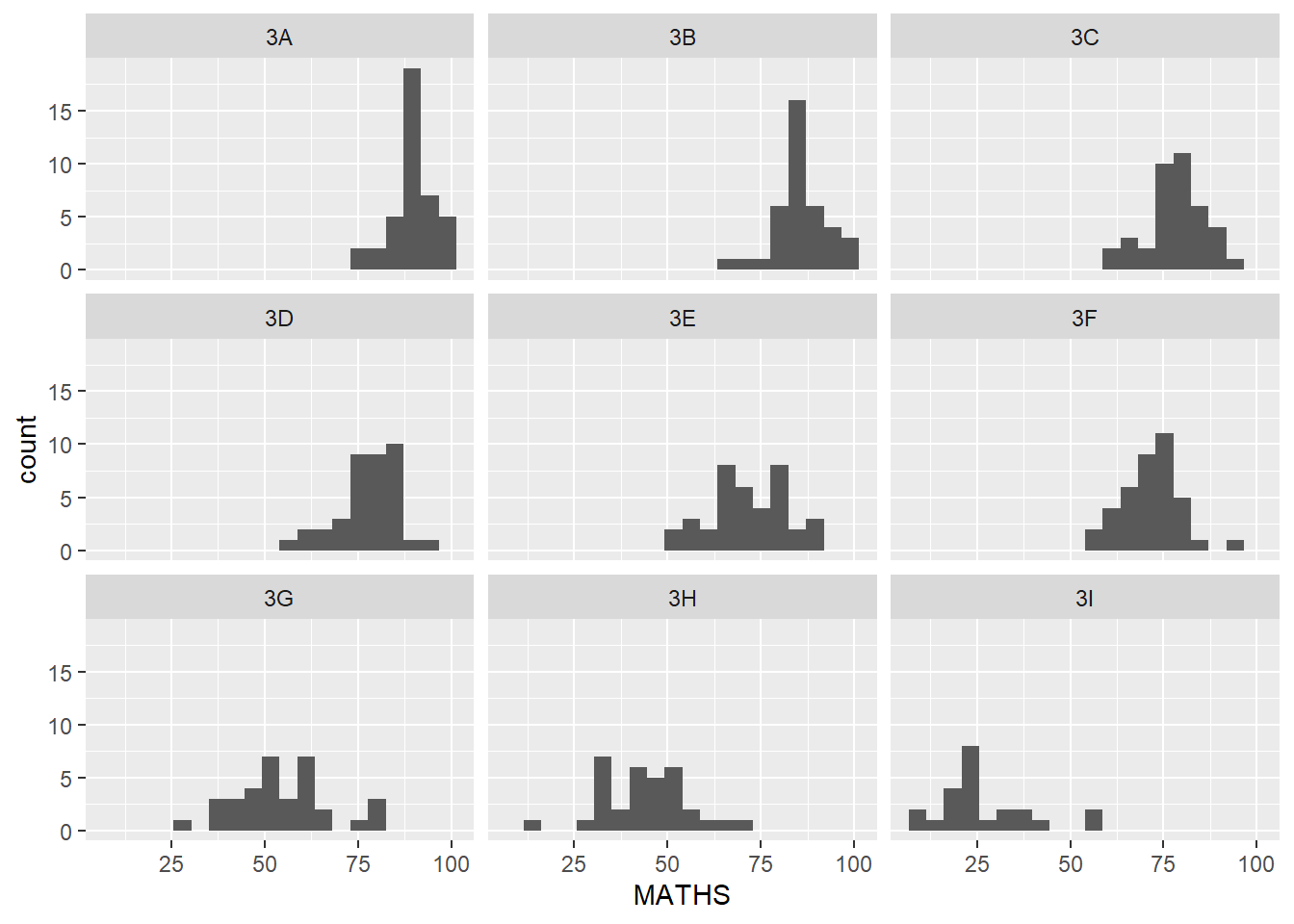
8.3 facet_grid() function
facet_grid() forms a matrix of panels defined by row and column facetting variables. It is most useful when you have two discrete variables, and all combinations of the variables exist in the data.
The code chunk below plots a trellis plot using facet_grid().
ggplot(data=exam_data,
       aes(x= MATHS)) +
  geom_histogram(bins=20) +
    facet_grid(~ CLASS)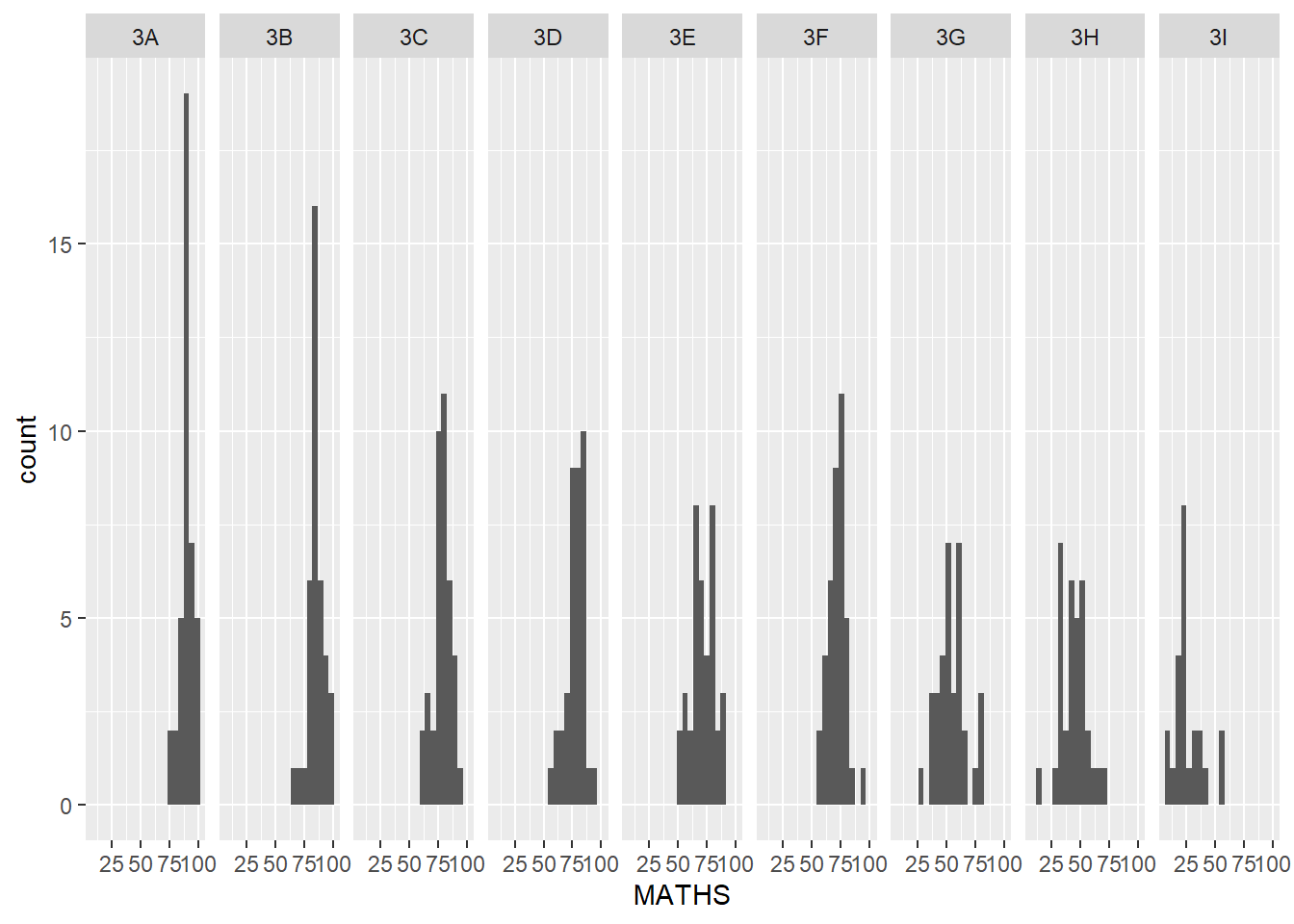
9 Essential Grammatical Elements in ggplot2: Coordinates
9.1 Introduction
The Coordinates functions map the position of objects onto the plane of the plot. There are a number of different possible coordinate systems to use, they are:
coord_cartesian(): the default cartesian coordinate systems, where you specify x and y values (e.g. allows you to zoom in or out
coord_flip(): a cartesian system with the x and y flipped.
coord_fixed(): a cartesian system with a “fixed” aspect ratio (e.g. 1.78 for a “widescreen” plot).
coord_quickmap(): a coordinate system that approximates a good aspect ratio for maps.
9.2 Working with Coordinate
By the default, the bar chart of ggplot2 is in vertical form.
ggplot(data=exam_data,
       aes(x=RACE)) +
  geom_bar()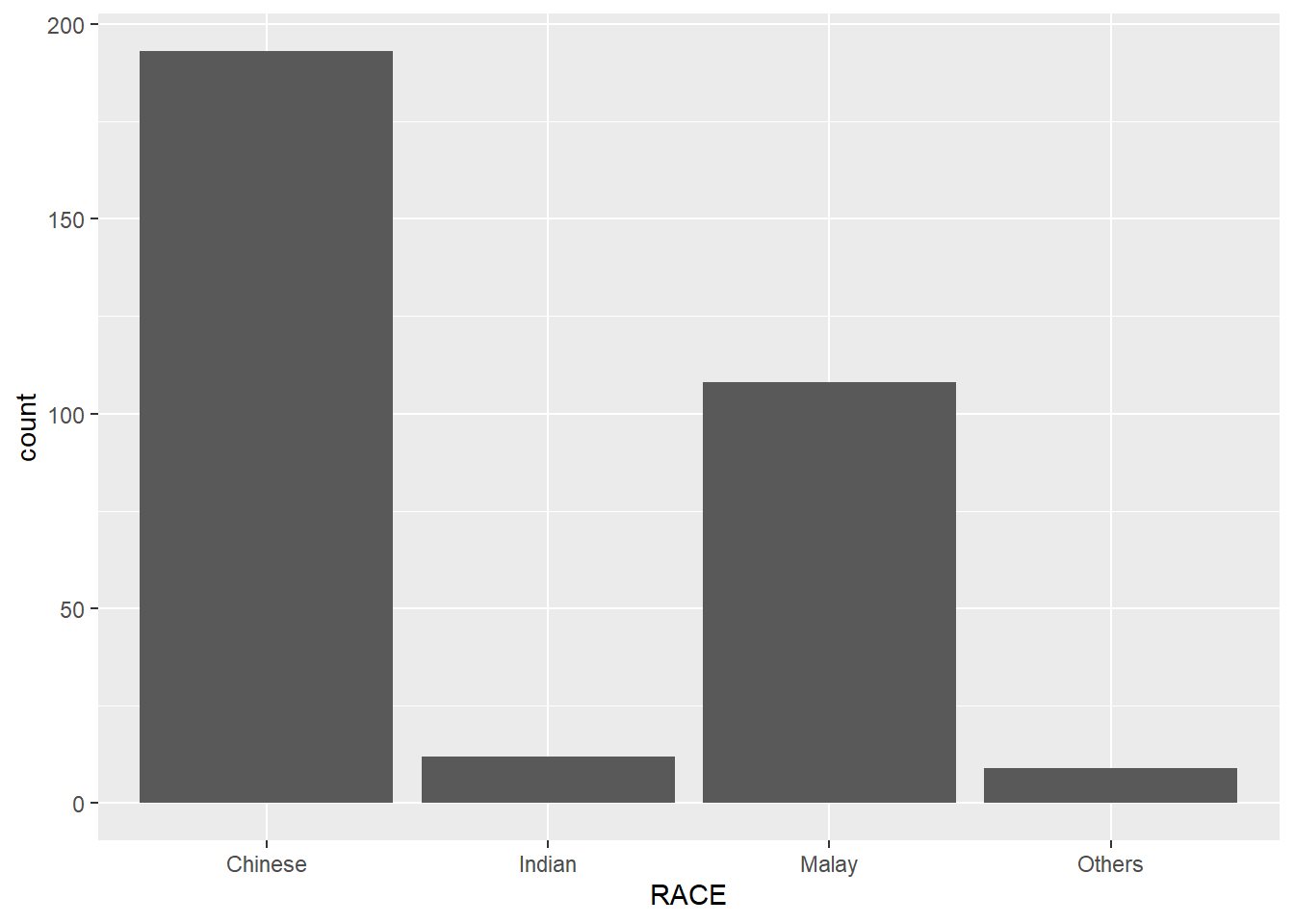
The code chunk below flips the horizontal bar chart into vertical bar chart by using coord_flip().
ggplot(data=exam_data,
       aes(x=RACE)) +
  geom_bar() +
  coord_flip()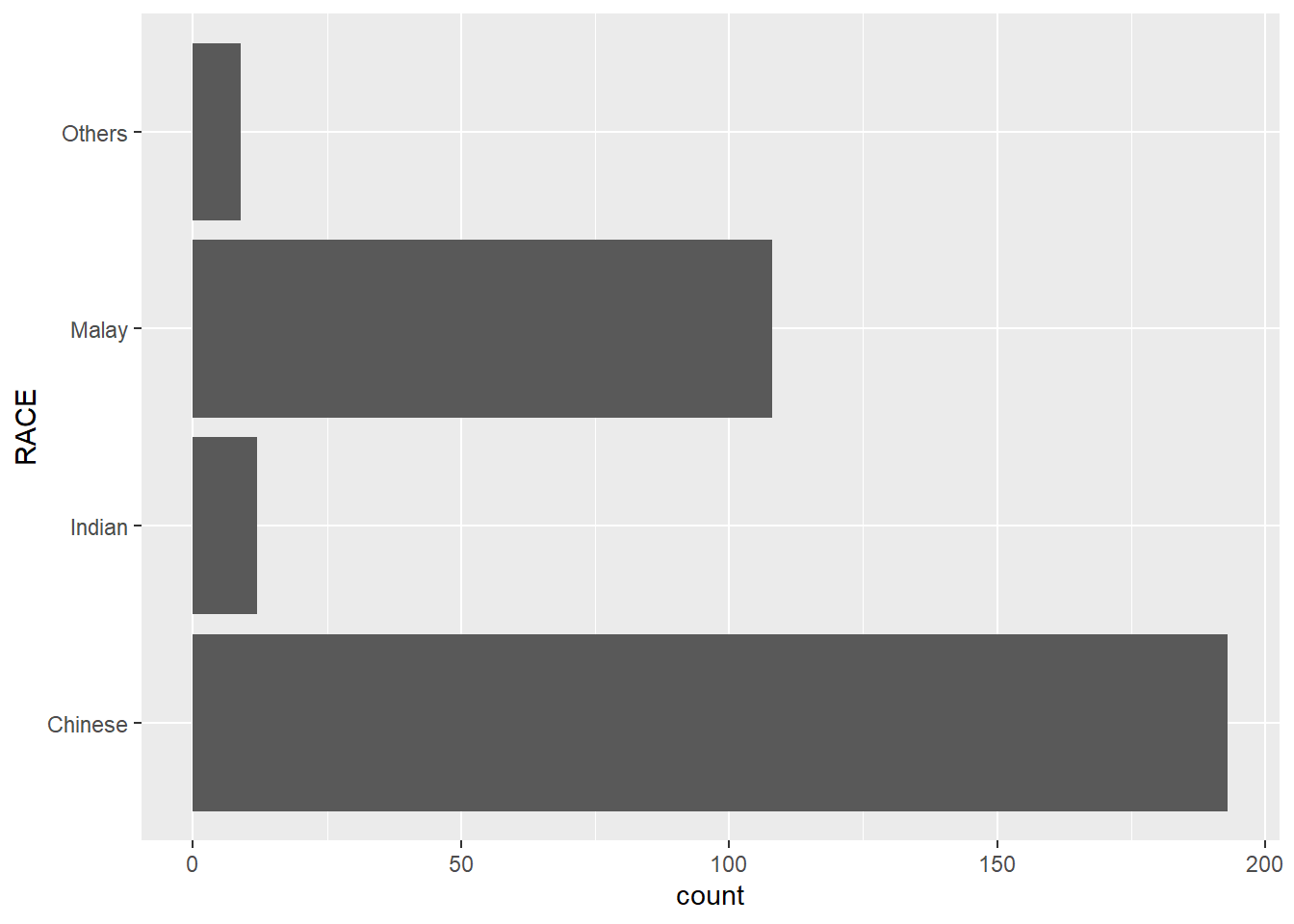
9.3 Changing the y- and x-axis range
The scatterplot below is slightly misleading because the y-aixs and x-axis range are not equal.
ggplot(data=exam_data,
       aes(x= MATHS, y=ENGLISH)) +
  geom_point() +
  geom_smooth(method=lm, size=0.5)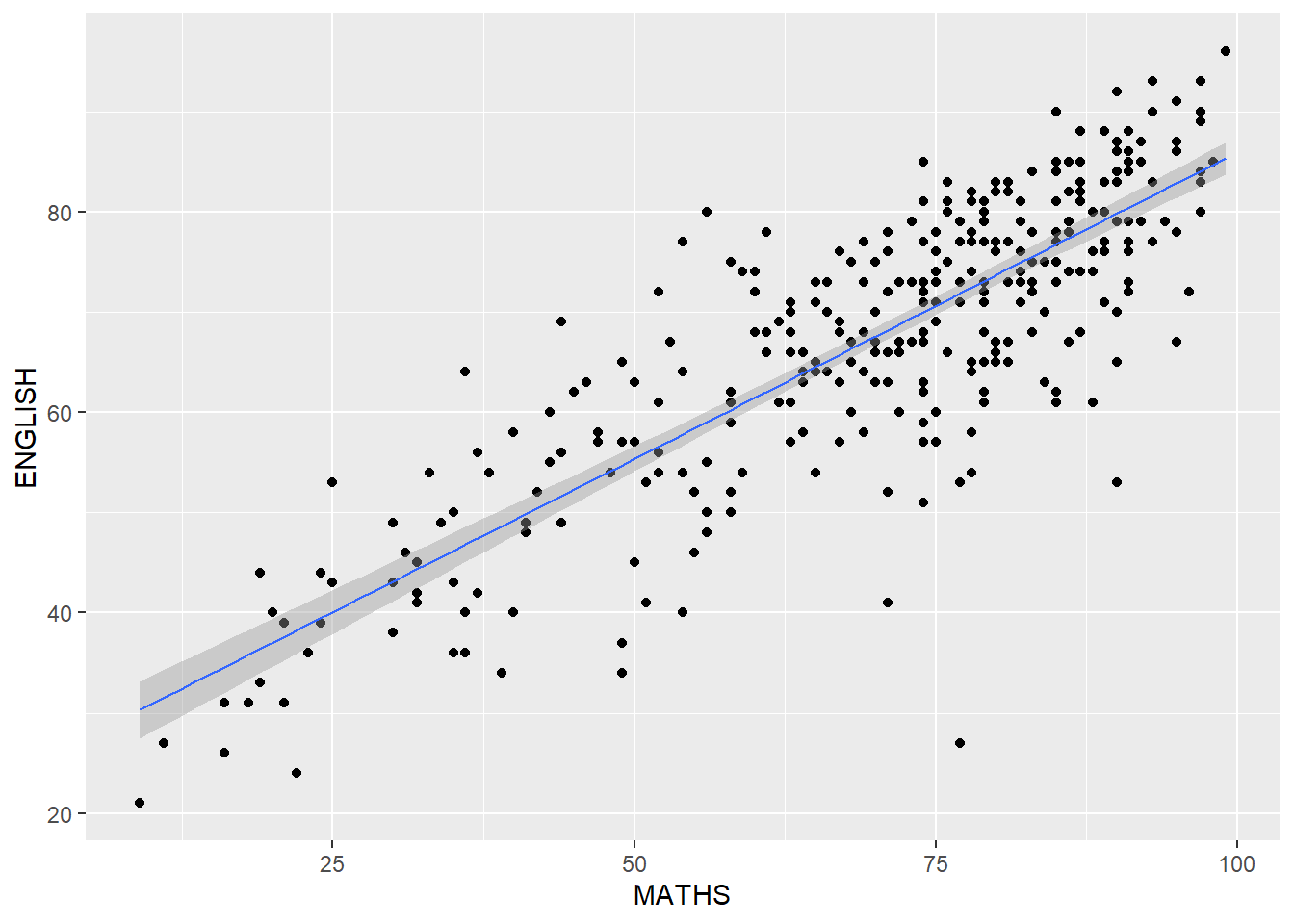
The code chunk below fixed both the y-axis and x-axis range from 0-100.
ggplot(data=exam_data,
       aes(x= MATHS, y=ENGLISH)) +
  geom_point() +
  geom_smooth(method=lm,
              size=0.5) +
  coord_cartesian(xlim=c(0,100),
                  ylim=c(0,100))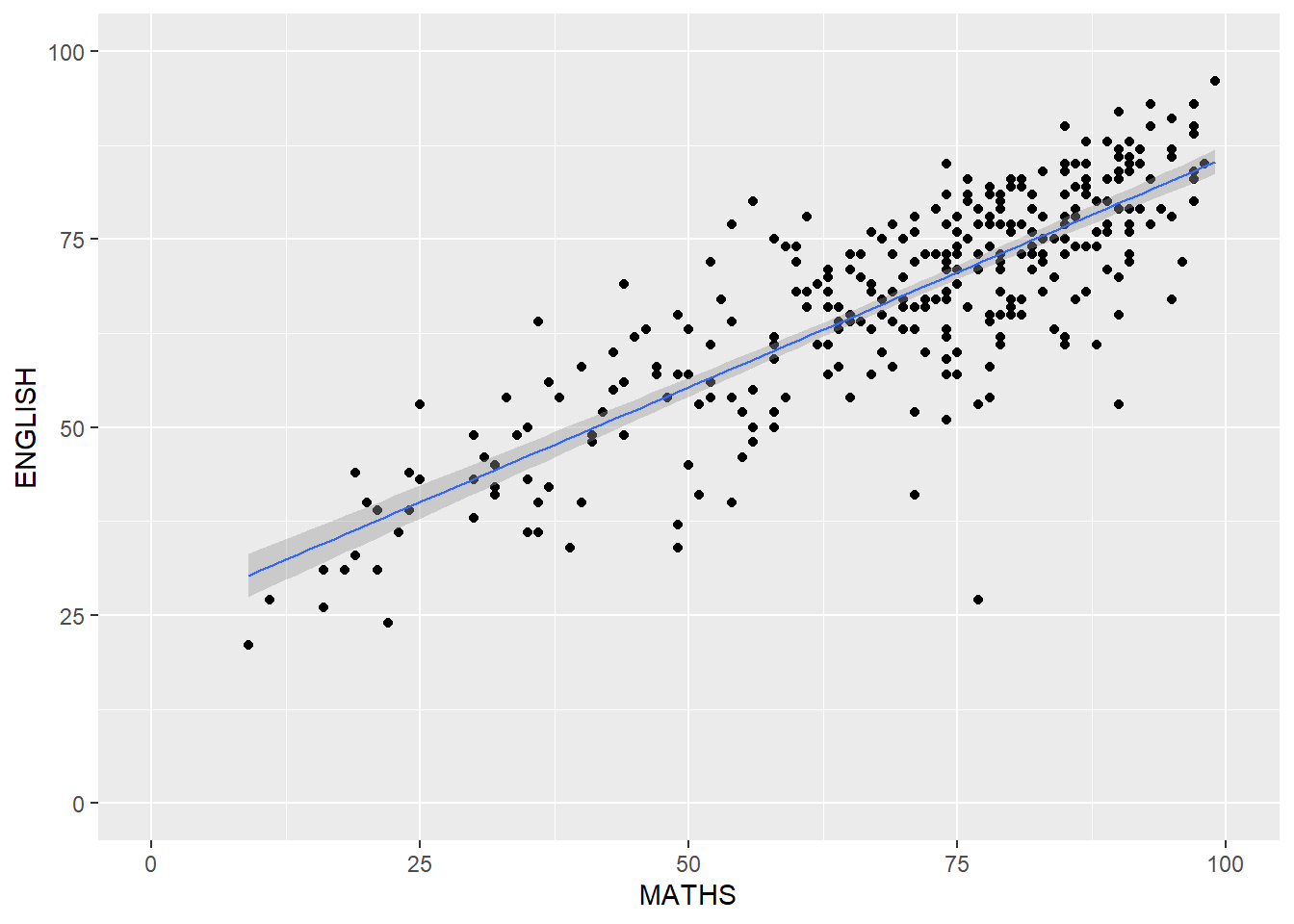
10 Essential Grammatical Elements in ggplot2: themes
10.1 Introduction
Themes control elements of the graph not related to the data. For example:
background colour
size of fonts
gridlines
colour of labels
Built-in themes include: - theme_gray() (default) - theme_bw() - theme_classic()
Each theme element can be conceived of as either a line (e.g. x-axis), a rectangle (e.g. graph background), or text (e.g. axis title).
10.2 Working with theme
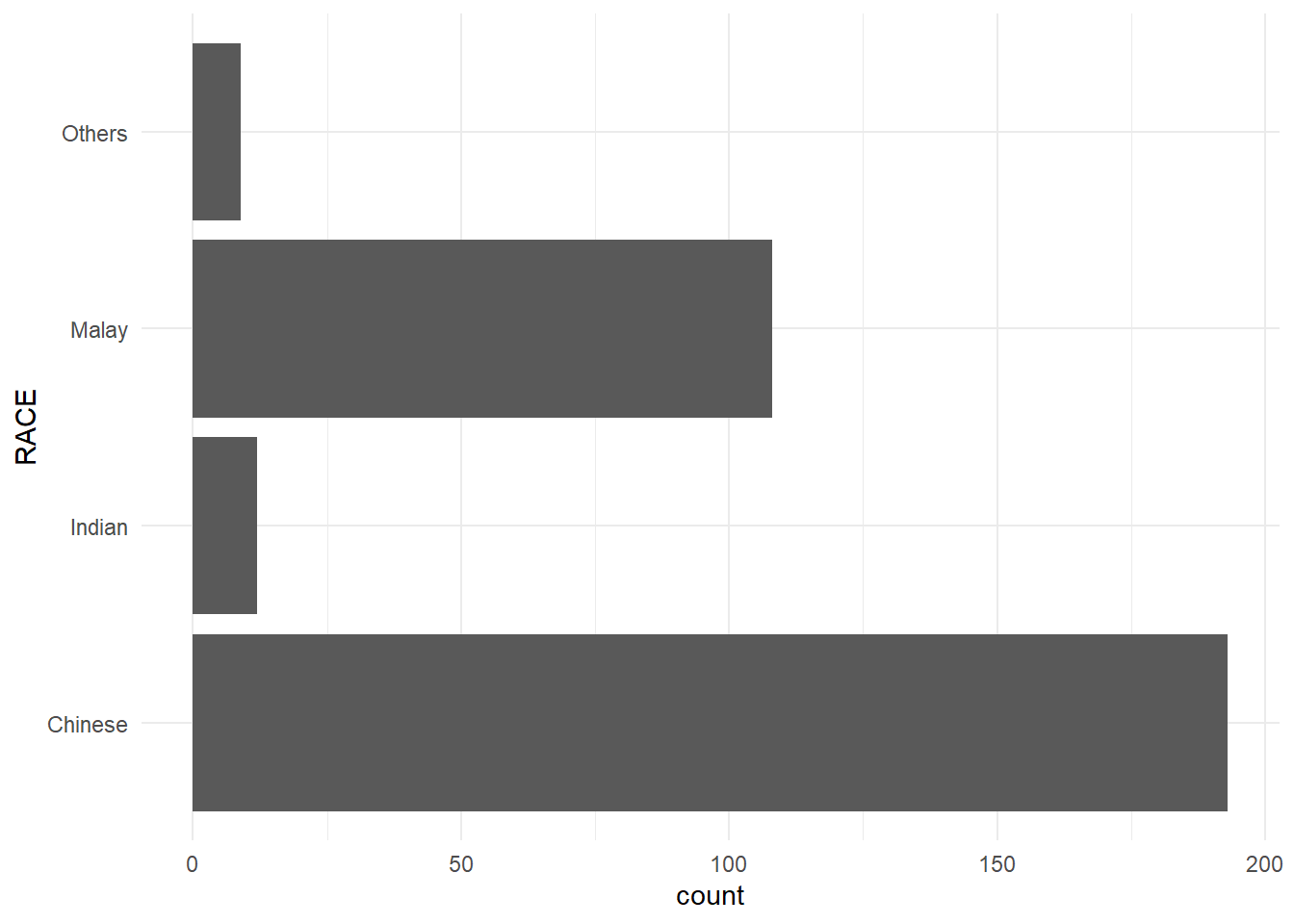
The code chunk below plot a horizontal bar chart using theme_gray().
ggplot(data=exam_data,
       aes(x=RACE)) +
  geom_bar() +
  coord_flip() +
  theme_gray()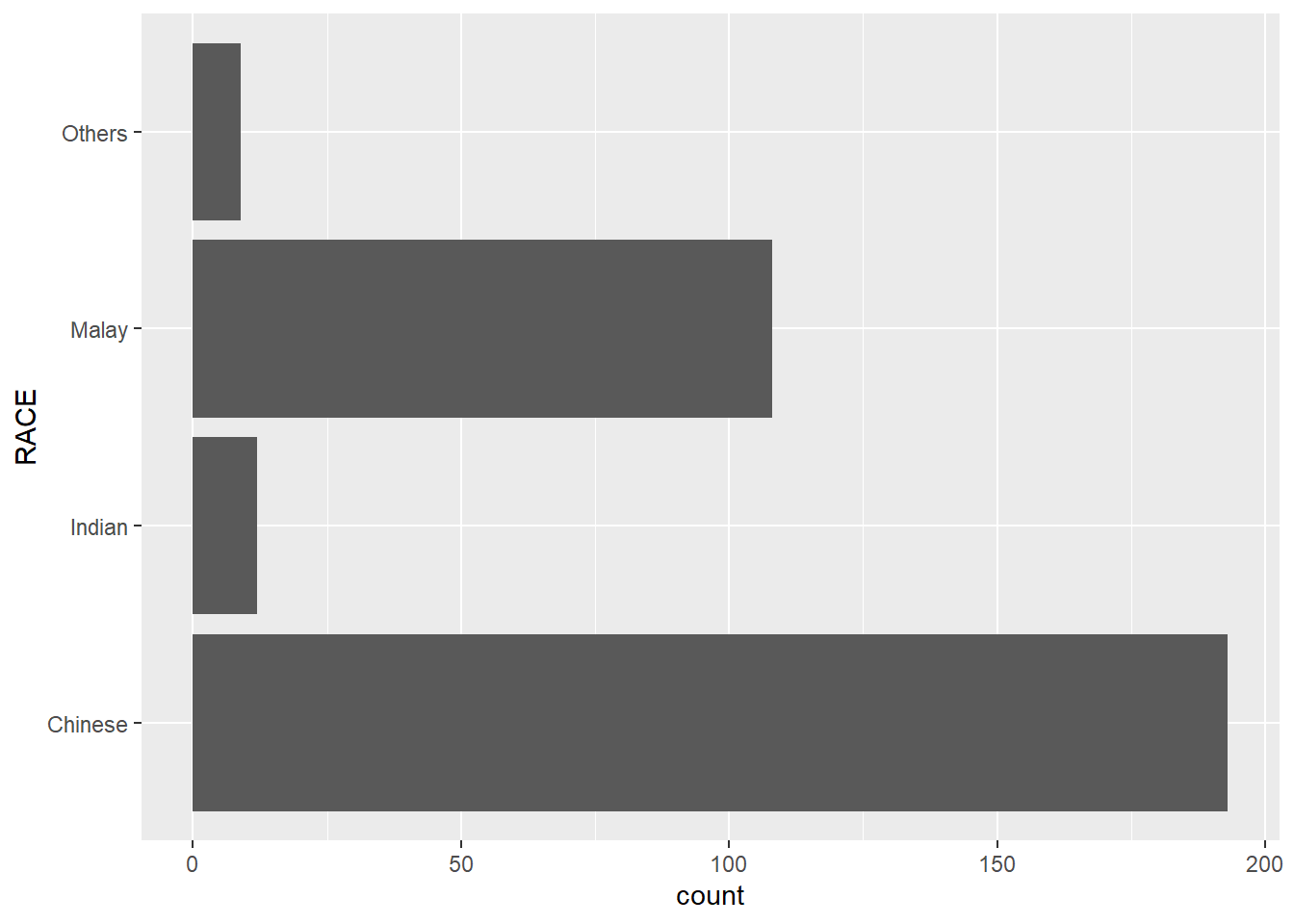
A horizontal bar chart plotted using theme_classic().
ggplot(data=exam_data,
       aes(x=RACE)) +
  geom_bar() +
  coord_flip() +
  theme_classic()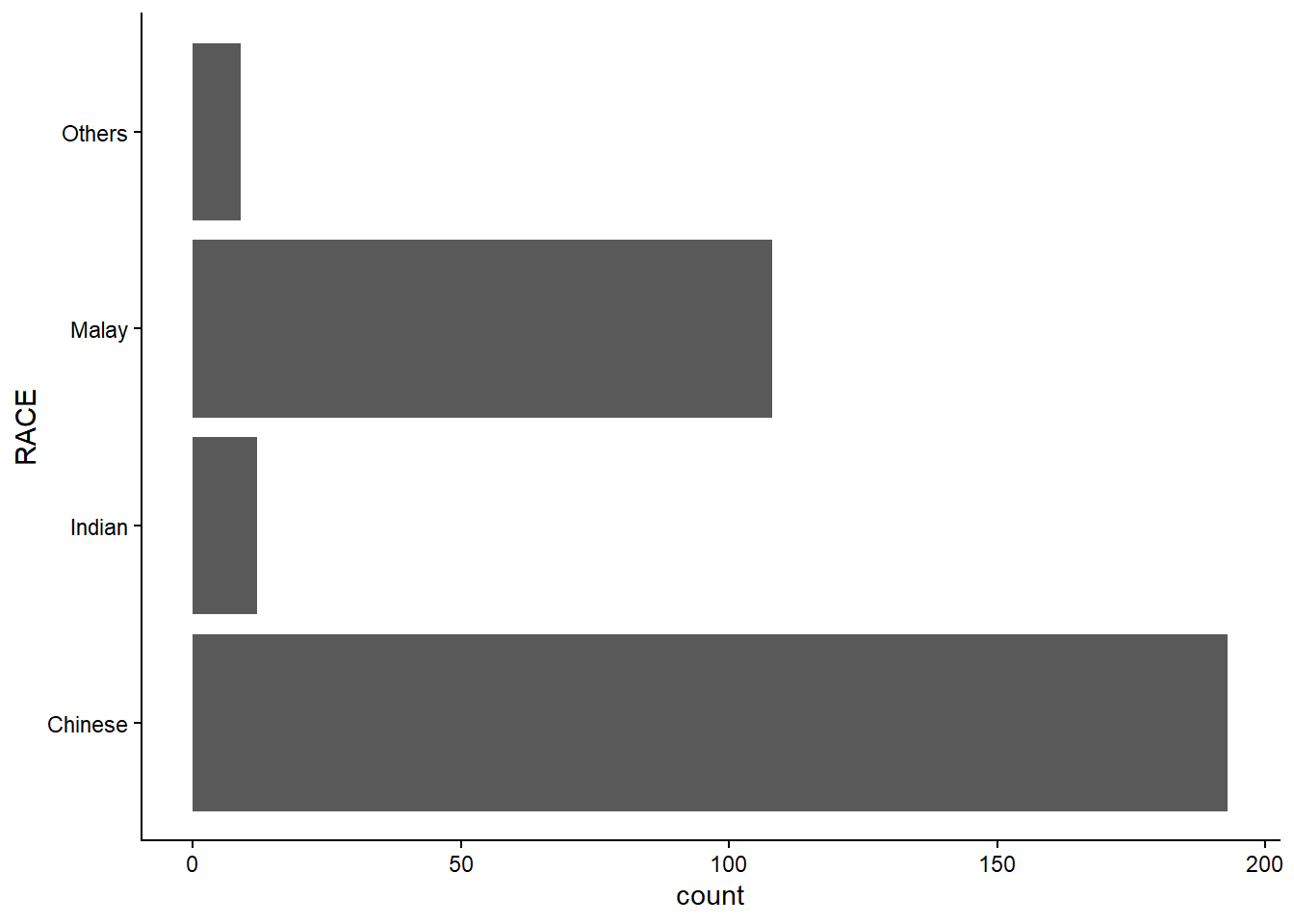
A horizontal bar chart plotted using theme_minimal().
ggplot(data=exam_data,
       aes(x=RACE)) +
  geom_bar() +
  coord_flip() +
  theme_minimal()